
Marketing automation for a small business: the first five, in build order.
Not a tour of what automation can do. Five workflows that cover the moments you already handle by hand, in the order that makes each one easier than the last — with the trigger, the exit rules, the go-live test and the one number written out for every one of them.
What you will have at the end
- Five workflows in build order, each one feeding the next
- A written trigger and a written exit rule for every automation you turn on
- The behavior split that stops one message going to people who did different things
- A go-live test you run as a real contact before anybody else sees it
- One number per workflow, chosen before it goes live
- A rule for what to build sixth — and what to leave manual on purpose
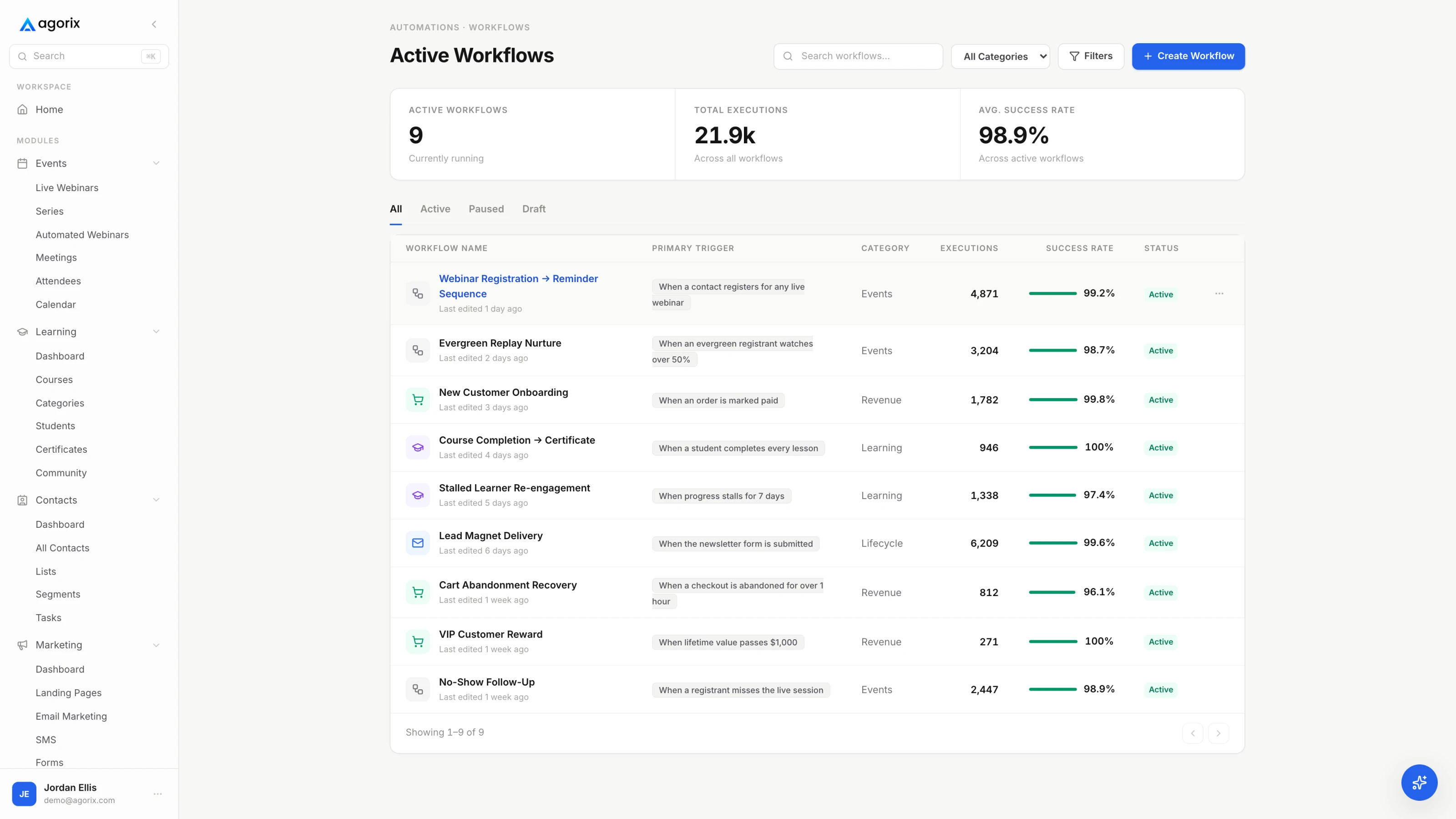
Automate the path you have already walked by hand.
A workflow is a decision you have already made, written down so it happens without you. If you have not made the decision yet, automating it only makes the indecision run faster and more often.
That is why this guide is ordered rather than listed. Every one of the five below describes something almost every business already does manually and inconsistently: greeting somebody new, reminding people about a session, following up differently depending on what somebody did, treating a buyer like a buyer, and deciding what to do about the people who stopped listening. Nothing here asks you to invent a new marketing motion. It asks you to stop performing five existing ones from memory.
Three rules that apply to all five
- Manual first. Do the thing by hand until the steps stop changing. If your last five welcome emails were all different, you do not have a workflow yet — you have a draft, and automating a draft distributes it.
- Every entrance needs an exit. Write down what removes somebody before you write what adds them. Nearly all automation damage is a correctly written message arriving in a sequence the person should already have left.
- One number each, chosen first. Decide before go-live which single number this workflow is supposed to move. If you cannot name one, you will not be able to tell later whether the thing is working or merely running.
The five, at a glance
| Order | The automation |
|---|---|
| 01 | The welcome pathSomebody new arrives and nothing happens until you notice them. |
| 02 | The event registration pathSomebody signs up for a session, needs three reminders, and has to be sorted at the end by whether they turned up. |
| 03 | The post-event behavior splitThe session ends and everyone gets the same email regardless of what they did. |
| 04 | The purchase pathMoney changes hands — or does not — and the messaging carries on as though nothing happened. |
| 05 | The win-backSomebody stops opening anything and stays on the list forever anyway. |
Build them in that order. The welcome path teaches you how your sending behaves on every contact you own. The event path teaches you scheduling and the first split. The behavior split is the first one that genuinely needs to know what somebody did. The purchase path is the first one where being wrong costs money. The win-back is the only one that is allowed to end the relationship, which is why it comes last.
Build the one that runs every single day first.
Everything else on this list waits for a session, a purchase or a lapse. The welcome path fires the moment somebody joins, which makes it the highest-volume workflow you will own and the cheapest one to learn on.
What it automates is the introduction you would otherwise write forty times and eventually stop writing. Deliver the thing they actually asked for, say who you are and why you are worth an inbox slot, set the expectation for how often you will write, and make one small ask — a reply, a click, a reading, a booking. One ask, not five.
Three to five messages over the first week or two is a reasonable working shape, not a benchmark. The number that matters is not how many you send but whether each one has a job the previous one did not do. The full set, written out with subject lines, is in the welcome email sequence guide; what follows here is the workflow around them.
- Trigger
- A new contact is created — from a form, a lead magnet download, a checkout or a manual add. Trigger on the entry point rather than on a tag you have to remember to apply, and give each entry point its own source value so you can tell later where your best contacts came from.
- Exit rules
- A purchase hands them to the purchase path. A registration hands the clock to the event path. Reaching the end hands them to the regular schedule. Two sequences must never own the same inbox on the same day — decide now which one yields.
- Test before go-live
- Sign up as a real person, from the real form, on a phone. Delivery, the from-name, every link, the reply-to, and the unsubscribe. The full version is the workflow testing checklist.
- The one number
- The share of new contacts who take the single action the sequence asks for. Not open rate — open rate tells you a subject line worked, which is a different question from whether the workflow did its job.
Where this one goes wrong
Almost always in the same two places. The first is asking for five things — reply to this, follow me there, book a call, read the blog, buy the thing — which produces none of them. The second is deliverability: a welcome path is the first email most contacts ever receive from you, so if authentication, the sending domain or the from-address is not set up properly, this workflow is where you find out at scale. Sort that before go-live, not after the first bad week.
Confirm, remind, then sort by whether they turned up.
Second because it is the first one with a deadline inside it. A reminder that goes out late is worth nothing, and a reminder nobody sends because they were busy that morning is worth less. This workflow pays for itself the first time you run a session with it.
The shape is fixed and boring, which is exactly what you want from it. Confirmation on signup with the join link and the calendar file. A reminder the day before with the time in their timezone. A short one an hour out. A very short one ten minutes out — the highest-yield message in the sequence and the one most often left as a draft. Then the last act, which is the whole reason this is a workflow and not a sequence: at the end it sorts everyone into two rooms, attended and did not.
Build one per session type rather than one per session. The monthly demo, the quarterly training and the launch webinar are three workflows you will reuse for years; a workflow per date is how people end up with forty of them and no idea which are live. Every message in this path is written out in the webinar email sequence templates, and the session it wraps around is covered end to end in how to host a webinar.
- Trigger
- Registration for the session. One workflow per session type, reused for every date, with the date and the join link supplied by the event rather than typed into the emails.
- Exit rules
- Registering removes them from every sequence still inviting them — this is the exit people forget, and being invited to something you already signed up for reads as carelessness. Attendance moves them to the attended branch, absence to the no-show branch, and a purchase before the session stops the selling immediately.
- Test before go-live
- Register yourself and read every message in order. Confirm the join link works from both the confirmation email and the calendar entry. Most importantly, confirm the ten-minute reminder is scheduled rather than drafted, because that is the one that fails silently.
- The one number
- Show-up rate: live attendees divided by registrations. It judges this workflow and nothing else. If it moves after you change a reminder, the reminder was the cause; nothing else in the funnel touches that ratio.
One caution before you promote a session: check the attendee ceiling of whatever room you are using. Running out of space mid-session is a failure no follow-up recovers, and it is a capacity question rather than a marketing one.
One message to everyone wastes the only two days that matter.
The session created the intent. The next forty-eight hours decide what that intent was worth, and the difference between a good result and a wasted one is whether the follow-up knows what each person actually did.
This is the first workflow on the list that is not a sequence with conditions bolted on. It is a decision tree whose branches are behaviors, and it exists because the five people below are in genuinely different situations. Sending them one email treats the person who stayed to the end and did not buy exactly like the person who never showed, which is the single most expensive piece of laziness in small-business marketing.
- Bought. Out of every sales branch immediately and into the purchase path. Nothing reads worse than a deadline reminder arriving after somebody paid.
- Stayed through the offer, did not buy. The warmest branch. Address the objection the live questions surfaced, restate the deadline you announced, and make replying to a human easy.
- Left before the offer. They liked the teaching and never saw the thing. Send the offer section rather than the whole replay.
- Left early. Something was wrong — fit, timing, or the first ten minutes. Short replay, low pressure, back to the regular schedule.
- No-show. A separate audience, not a failed attendee. Replay with a genuine deadline, then a longer nurture path rather than the buyer follow-up.
The sequencing inside that window — what goes out at two hours, at twenty-four, at the deadline — is worth its own read: the follow-up window decides what the session was worth.
- Trigger
- The session ends, evaluated against each registrant’s attendance and watch-time record. The branch condition is behavior, not a manually applied tag — if somebody has to sort the list first, this is not a workflow.
- Exit rules
- A purchase pulls somebody out of every sales branch the moment it happens. Each branch ends on the deadline you announced publicly rather than whenever the messages run out — and you hold that deadline, because extending it teaches the list that your deadlines are decorative.
- Test before go-live
- Three test contacts, manually set to three states — attended and stayed, left early, never showed — run through the workflow before a real session ever touches it. Confirm each lands in the branch you intended and only that one.
- The one number
- Attributed conversion: purchases traceable to the session divided by registrations. If registration, attendance and purchase do not sit on one record, this figure is an estimate and should be labelled as one wherever you report it.
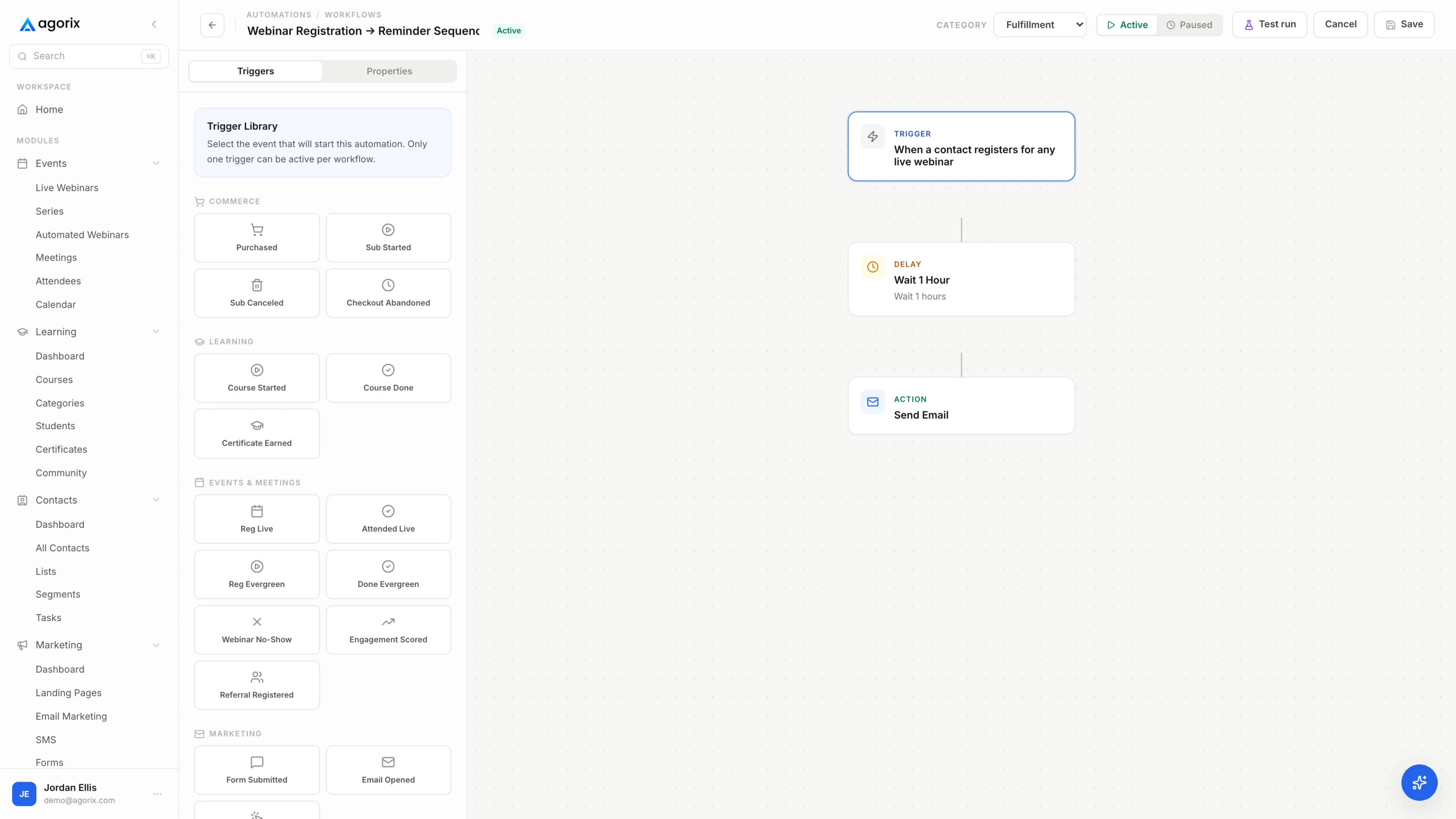
Branching on behavior needs the behavior in the same place as the send.
Every automation from here on decides something using what a person did somewhere else. In Agorix the attendance, the watch time, the checkout and the send are one customer story, so the branch reads the record rather than waiting on a sync — see how workflows work.
Receipt, onboarding, and the lane for the people who did not buy.
Two workflows that share a moment: what happens when the payment succeeds, and what happens when the checkout was opened and the payment never came. Build them together, because the exit rule that connects them is the one that costs you most when it is missing.
The bought lane
Three things happen immediately and in this order: the receipt with what they bought and what happens next, access to the thing, and the hard stop on every sales message anywhere in your system. Then onboarding begins, and the job of onboarding is a first use rather than a feature tour. Get them to the first lesson, the first booking, the first working result — one milestone, named in advance, which is also the thing you measure. Student onboarding emails covers the messages; if you sell something other than a course, the shape is the same and the milestone changes.
The didn’t-buy lane
Somebody reached the checkout and left, or the offer window closed without a purchase. Before you send anything, check they do not already own it — the fastest way to look automated in the bad sense is to chase a customer for something they bought last month. Then send the useful version: the question the checkout raised, the terms, the guarantee, a way to talk to a person. The follow-up funnel covers the arc, and checkout page optimization covers the more useful question, which is why the checkout is losing people in the first place.
- Trigger
- Two of them. A completed purchase starts the bought lane. Checkout activity without a purchase after an interval you choose starts the other one — and the interval is a real decision, because too short reads as surveillance and too long arrives after they have forgotten.
- Exit rules
- A purchase ends the didn’t-buy lane instantly, and ends every other sales branch anywhere in the system. Onboarding ends when the person reaches the milestone it exists to produce, or after a fixed number of messages — an onboarding sequence that keeps going after somebody has clearly onboarded is just mail.
- Test before go-live
- Buy your own product with a real card, then refund it. Read the receipt, click the access link from a logged-out browser, and confirm the sales sequence stopped. Then abandon a checkout deliberately and watch the other lane fire on the interval you set.
- The one number
- For the bought lane: the share of buyers who reach the named first-use milestone inside a week. For the other lane: recovered purchases as a share of abandoned checkouts. Two lanes, two numbers, both about behavior rather than sends.
A note on refunds and guarantees, because this is the workflow that touches them. Whatever your policy is, the receipt should state it in the same words as the sales page. Automation makes inconsistency visible: a generous promise on the page and a grudging one in the receipt is a contradiction that used to be invisible because a human wrote each one from scratch. Write the policy once and have both places quote it.
The list you already paid for, before you go and buy another one.
A contact who has not opened anything in months is not a lost cause and not an asset either. The win-back decides which, on purpose and on a schedule, instead of letting the question sit there costing you money in contact limits and deliverability.
Start by defining lapsed in your own terms and writing the definition down. Something like: no opens or clicks in ninety days, no purchase in a hundred and eighty, and not currently inside another workflow. The exact numbers matter less than the fact that they are numbers rather than a feeling, because this is the one workflow that is allowed to end a relationship and you want that decision to be legible six months from now.
Three messages is usually enough. The useful one — no ask, just the single most valuable thing you have published since they stopped paying attention. The direct one — here is what we do now, here is what has changed, here is the one thing worth your time. Then the permission close: should I stop? Ask it plainly, make leaving one click, and then honour the answer, including the silence. The re-engagement campaign guide writes all three out.
- Trigger
- Defined inactivity — no opens, clicks, purchases or event attendance inside a window you choose. This is the only workflow on the list triggered by an absence rather than an action, which makes it the easiest one to build wrong and the easiest one to forget you built.
- Exit rules
- Any engagement returns them to the regular schedule the same day. No engagement by the end means suppressed, not sent again, and that suppression is the point of the workflow rather than a side effect of it. Anyone in another active workflow is excluded from entry entirely.
- Test before go-live
- Set a test contact’s last activity backwards and confirm the workflow picks them up. Then engage as that contact mid-sequence and confirm it releases them immediately. A win-back that keeps sending after somebody replies is worse than no win-back.
- The one number
- Reactivation rate: contacts who engage during the window divided by contacts who entered it. Then watch what your delivery and complaint figures do in the month after you suppress the rest — that second effect is usually the larger of the two.
Why suppression is the feature
The instinct is to keep everybody, on the grounds that a big list looks like an asset. Sending to people who never engage costs you twice: once in whatever you pay for marketing contacts, and once in deliverability, because inbox providers read sustained non-engagement as a signal about you. A smaller list that opens things is worth more than a larger one that does not, and this workflow is how you get there deliberately rather than by attrition. Segmentation on a small list covers how to keep the segments simple enough to maintain.
Test as a person, not as the person who built it.
Every workflow above is a message sent to a human being on your behalf while you are asleep. Previewing is not testing. The difference is that a preview shows you what you wrote and a test shows you what the system does.
Run this before each workflow goes live, and again whenever you change a trigger, a condition or an exit. It takes about twenty minutes per workflow. The deeper version, including what to test after you change something in a live workflow, is the workflow testing checklist.
Run it as a real contact
Prove the exits
Check the edges
Confirm you can read it
Five is a system. Fifteen is a maintenance problem.
The five above are safe to build because you already do all five by hand. The sixth is where judgment starts, and where most automation projects quietly go wrong — not by building something bad, but by building something nobody needed and everybody now has to maintain.
So the closing rule is the same one this guide opened with, applied to everything that comes after it: do it manually until the steps stop changing, then automate the version that stopped changing. Not the version you wish you were running. Not the version a template suggests. The one you have actually performed, repeatedly, the same way, with an outcome you were happy with.
Two obvious candidates come up next and deserve a warning each. Lead scoring is genuinely useful once you have enough behavior to score and actively harmful before then, because a made-up score gets treated as a fact — lead scoring for a small business covers when it is warranted. And handing steps to an AI agent is a delegation decision rather than an automation one, which means it needs review gates before it needs enthusiasm — approval gates is the guide for that.
What to automate sixth is a judgment call with three tests.
Is it repeatable — have you done it manually five times the same way? Is it reversible — what happens when it fires wrong, and how many people see it? Is the volume real — is the manual cost measured in hours a month or in minutes a year? Anything that fails one of those stays manual on purpose, which is a decision rather than a backlog item. When to automate marketing works through all three, plus the list of work that should stay human permanently.
Six questions before you turn anything on.
What should a small business automate first?
The welcome path — the sequence that fires when somebody new joins your list. It runs more often than anything else you will build, it touches every contact you acquire, and you can test it honestly in thirty seconds by entering it yourself. Build it, watch it for a fortnight, then automate whichever moment you currently handle by hand most often. The emails themselves are written out in the welcome email sequence guide.
How many marketing automations does a small business need?
Five cover most of it: the welcome path, the event registration path, the post-event behavior split, the purchase path and the win-back. Those are the moments nearly every business already handles manually, which is exactly why they are safe to automate — you are writing down a decision you have already made rather than inventing one. Past those five, each new workflow has to earn its place against a job you have already done by hand, and it arrives with the same maintenance cost as the first five.
Is marketing automation worth it if my list is small?
It depends on what you are automating, not on the size of the list. A welcome path is worth building at fifty contacts because it runs on every one of them and the alternative is remembering. A lead-scoring model is not worth building at fifty contacts because there is not enough behavior to score. The test is whether the work is repeatable and whether the manual cost is real — when to automate marketing works through all three tests in order.
How do I stop somebody receiving two automations at once?
Write exit rules before you write emails. Every workflow needs an answer to what removes somebody from it, not only what puts them in. A registration stops the invitations. A purchase stops every sales message immediately, in both directions. Any engagement ends a win-back. Most automation damage is not a badly written email — it is a correctly written email arriving in a sequence the person should already have left, and the reader can tell the difference between a mistake and not being paid attention to.
What is the difference between an email sequence and a workflow?
A sequence sends a fixed set of messages on a timer. A workflow can look at what somebody did between the messages and take a different path because of it — attended or missed, bought or abandoned, progressed or stalled. Every automation on this list starts as a sequence and becomes a workflow the moment it needs to branch, which is usually at the third one. The mechanics of branching on behavior are covered in behavioral trigger workflows.
How do I know a marketing automation is working?
Give each workflow a single number before you turn it on, and make it a number about behavior rather than delivery. Open rate tells you a subject line got past an inbox; it does not tell you the workflow did its job. The welcome path is judged on the share of new contacts who take the action it asks for. The registration path on show-up rate. The behavior split on attributed conversion. The purchase path on how many buyers reach first use. The win-back on how many lapsed contacts come back. One number each, chosen in advance, compared only to your own previous figure.
The next four things to read.
You now have the build order. Agorix is the system that runs it.
Pages, forms, email, the live room, checkout, courses and the workflows between them — on one customer record, so a trigger can read what actually happened and an exit rule can hear a purchase the moment it lands.
14 days · $0 due today · Payment method required · Cancel before first charge and pay nothing