Skip to content
Agorix
Updated 29 July 2026

Email segmentation for a small business list: five splits that pay.

Under ten thousand contacts, demographic segments run out of members before they run out of theory. What someone did beats what they said they were — here are the five behavioural splits worth maintaining, the point at which a segment stops being worth having, and one campaign written three ways.

05splits that pay
02to build first
9maintenance items

What you will have at the end

  • A working definition of a segment that stops you building thirty of them
  • Five splits that earn their keep on a list under ten thousand contacts
  • The test for when a segment is too small to be worth treating differently
  • Self-updating conditions instead of exported lists that rot within a month
  • One campaign written three ways, with only the differences marked
  • A first week: two segments now, a third only when it changes a send
Audience segments built from attendance, purchase history and campaign behaviour.
Rule 00Behaviour first

What someone did beats what they said they were.

Segmentation advice is mostly written for lists with hundreds of thousands of people on them. On a small business list — a few hundred to a few thousand contacts — the arithmetic changes, and so does the answer.

Split four thousand people by industry, company size and role and you get cells of a few dozen each. Every one of those cells needs its own copy, its own maintenance and its own place in your head, and none of them is big enough to justify the drafting. The grid looks professional and produces the same email five times with a different noun at the top.

Self-reported fields also age badly and quietly. Somebody told a form what their role was; that was true on the day they typed it, and nothing in your system will ever tell you when it stopped being true. Behaviour has the opposite properties. It is observed rather than claimed, it carries a date, and it is already attached to something you sent — which means it points at a message instead of merely describing a person.

The test that keeps the number down

Before you create a segment, write the first sentence of the email that only that group receives. If you cannot, you have built a filter rather than a segment. Filters are fine — keep them in the query builder and use them when you need them. A segment is a standing promise to write something different, and every promise costs a draft for as long as it exists.

Where the useful behaviour comes from

Registrations and attendance. How long somebody stayed and whether they were there for the part that mattered. Clicks on specific things rather than on anything. Replies. Checkouts started and abandoned. Purchases, and which product. Course progress. Meetings booked, attended or missed. Most of that list is generated outside the email tool, which is the practical problem this guide keeps returning to.

Split 01–05The five splits05 that pay

Five splits, and what each one changes.

Every row below earns its keep because the email genuinely differs on either side of it. Build them in this order; stop when the next one does not change a send you are actually planning.

SplitThe conditionWhat changes
Customers · everyone elseHas purchased anything, everAlmost everything. A customer has already decided you are worth money; a prospect has not. The same email cannot do both jobs, and the make-the-case send is the one that makes a customer feel unseen.
Engaged 90d · coldClicked, replied, registered, attended or purchased in the last 90 daysHow often you send, and what you are willing to spend on them. The engaged group carries a campaign. The cold group gets a re-engagement path or a rest — never the fourth send of a launch.
Attended · registered onlyRegistered for [session] and attended = noThe subject line and the ask. One group saw the thing; the other meant to and did not. A recap and a next step for the first, a replay with a reason to press play for the second.
Topic interestClicked a link about [topic] in the last 120 daysWhich of two true things you lead with. Worth building only for the two or three topics where you would genuinely write a different opening paragraph.
Buyers by offerOwns [product A] · owns [A] and not [B]The next offer, and the suppression that goes with it. This is the split that stops you selling somebody something they already own, which is the error a list notices fastest.

The two that are hardest to get right

Engaged versus cold is only as good as the actions you count. Define it on things a person did on purpose — clicked, replied, registered, attended, purchased. Opens are the tempting ingredient and the weakest one, because whether an open gets recorded depends on how the recipient’s mail client handles a tracking image rather than on whether anybody read the message. A ninety-day window is a sensible starting default; the number matters far less than the fact that it expires.

Topic interest fails from over-collection. Tag every link with a topic and you end up with forty topics, none of which is a segment. Pick the two or three subjects you write about repeatedly, tag only those, and give the interest an expiry: a click from eighteen months ago is a fact about a person who no longer exists in the way you recorded them.

Suppression is the other half of every segment

Each split above implies a matching exclusion: registrants out of the invitations, buyers out of the sequence selling what they bought, the cold group out of the launch. Most of the damage a list takes comes from sends that a specific person should never have received, and suppression is far cheaper to build than the apology. The invitation and follow-up sequences in the webinar email templates are written with those exclusions already in them.

FloorToo small to split

When a segment is too small to treat differently.

There is no universal minimum size, and any number offered as one has been borrowed from a list that is not yours. Three questions settle it faster than a threshold does.

Does the message actually change?

Write the first sentence of the email only this group gets. If the only thing that differs is the first name, you have built a filter, not a segment — and filters are free to keep in a query builder rather than expensive to maintain as an audience.

Test 01 · relevance

Can it maintain itself?

If the segment needs a person to rebuild it, assume it will be wrong within a month and silently wrong within three. A condition that re-evaluates itself is worth more than a better-designed list that decays.

Test 02 · upkeep

Would a personal email be better?

Below a couple of dozen people, a campaign is the worse tool. Write to them individually, from your own address, and ask a question. You will get replies, and replies teach you more than a segment-level open count ever will.

Test 03 · scale

Notice what is not on that list: whether the segment is large enough to measure. On a small list it usually is not, and that is fine — segmenting is a relevance decision, not a measurement one. Two sends of forty people will differ from each other for reasons that have nothing to do with your copy, so do not read the difference as a result. If you want to learn something from a comparison, run it across the whole list instead; that is what simple A/B testing is for.

The ceiling, not the floor

Three or four active splits is plenty under ten thousand contacts.

The common failure on a small list is not too few segments. It is thirty of them, built during an enthusiastic afternoon, half of which nobody can define a year later and none of which has changed a send. Every segment you keep is a thing that can silently become wrong, and a wrong segment is worse than no segment because it sends confidently.

UpkeepSegments that rot

A list is a photograph. A condition is a rule.

The difference between segmentation that compounds and segmentation that becomes a liability is not how clever the splits are. It is whether they update themselves.

An exported list is true on the day it is exported and decays from that moment. Somebody buys on the fourth and stays in the prospect segment until somebody remembers to rebuild it. Somebody who went cold comes back to three sessions in a fortnight and stays labelled cold. A condition evaluated at send time has neither problem, because it asks the question again every time rather than remembering an answer.

Updates itself

  • Membership computed from behaviour every time you send, so yesterday’s buyer is already out of the prospect path
  • Conditions written in terms the business uses — owns, attended, clicked, purchased — rather than internal list names
  • Suppression attached to the offer rather than to the campaign, so it survives the next campaign too
  • Behavioural windows with an expiry date, so “engaged” means recently and keeps meaning it
  • One definition per idea: one “customer” segment, not four that disagree

Rots

  • A CSV exported on the first of the month and re-imported as a static list
  • Tags applied by hand after each event, by whoever remembered
  • An “engaged” list built once, in a week that is no longer relevant
  • A segment whose definition lives only in the head of the person who built it
  • Two systems each holding half of the condition, reconciled by eye before a send

Name them so you can read them later

Segment names are read by a stressed person thirty seconds before a send. Boring and consistent beats clever: cust-all, cust-none, eng-90d, evt-noshow-[session], owns-[product]. The prefix groups them, the suffix dates them, and nobody has to open the definition to know roughly who is inside.

Then decide who owns the definitions. One person who can say what “engaged” means in this business, and a written page they can point at. Segments drift most in organisations where two people each built half of them and neither is quite sure what the other meant by “active”.

The maintenance kit0 / 9 in place

Set up once

Every send

Where a tool decision changes the plan

Four of the five splits need behaviour the send never sees.

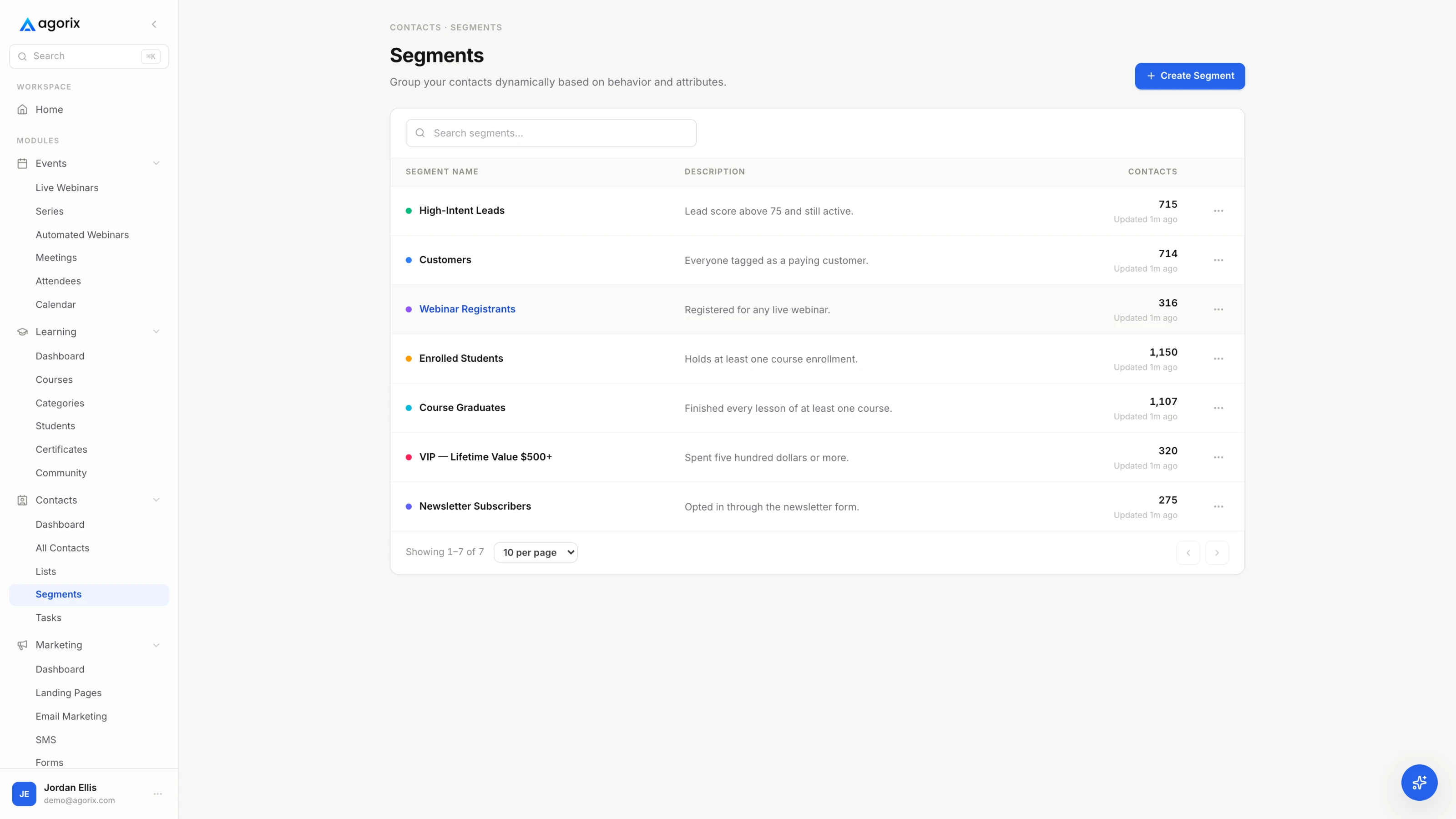
Customers-versus-not, attended-versus-registered, topic clicks and buyers-by-offer all depend on something recorded away from the email itself. Reconciling that by export is how segments start rotting on the day they are built. In Agorix the registration, the attendance, the click and the purchase sit on one customer record, so the audience changes when the customer does — see how marketing works.

Start your 14-day trial 14 days · $0 due today · Payment method required · Cancel before first charge and pay nothing
WorkedThree sends, three waysIllustrative

One campaign, three segments, three different jobs.

A worked example, with every name, product and date in brackets as a placeholder. It is a structure to copy rather than a case study, and there are no results claimed in it — yours will depend on your list.

The setup: [Studio] runs live sessions and sells two things, [Foundations] and [Advanced]. There is a week-long launch on for [Advanced]. Three segments are in scope, and the interesting part is that the campaign is not trying to do the same thing to all three.

SegmentDay 1 · announcementDay 4 · the middle sendDay 7 · last call
A · Owns [Foundations], has not bought [Advanced]Warmest group in the campaignAnnouncement that opens with what they already finished, and frames [Advanced] as the next step rather than a new thing.The one objection this group has — whether it repeats [Foundations] — answered with the outline, not with adjectives.Last call, sent only to the people in A who clicked and did not buy. The rest of A is left alone.
B · Attended [the last session], has bought nothingInterested, not yet paidAnnouncement that opens with the session they attended, and the question they asked in it if you kept the questions.The teaching send: the problem [Advanced] solves, taught properly, with the offer at the end rather than at the top.Last call to the clickers. Everyone else in B gets the replay of [the session] instead of a fourth ask.
C · Engaged in 90 days, never attended, never purchasedThe campaign’s job here is not the saleNot the launch. An invitation to [the next live session], because attending is the step this group has not taken yet.Nothing. They are in the invitation sequence for [the session], not in the launch.Reminder for [the session]. The offer reaches them from inside the room, where it is a demonstration rather than an email.

Segment C is the one worth studying. The campaign’s job there is not the sale — it is the attendance that has not happened yet. Selling [Advanced] to somebody who has never seen you teach spends the goodwill that would have got them into the room, and the room does the selling far better than a third email would.

What actually differs on Day 1

Only the opening, the proof and the ask. The bodies of the A and B emails can be substantially the same text — which is the honest cost of segmentation, and worth stating plainly because it is usually described as though it were three campaigns.

SEGMENT A — owns [Foundations]
[Name] — you finished [Foundations] in [month]. [Advanced] opens on
[date], and it starts exactly where [module 6] stopped.

SEGMENT B — attended, has not bought
[Name] — you were on [session title] on [date], and you asked about
[the thing they asked about]. That question is most of week two of
[Advanced], which opens [date].

SEGMENT C — engaged, never attended
[Name] — I am running [session title] on [date]. It covers [the
specific thing], and it is the quickest way to find out whether the
way I teach this is any use to you.

Day 7 adds one more split, created inside the campaign rather than before it: people who clicked and did not buy. That is a segment with a one-week lifespan, and it is the sort worth building — it changes a send, it maintains itself, and it disappears when the campaign ends. If you want that pattern to run without you, it becomes a behavioural trigger.

Week 1Where to start

Two segments this week. The third when it changes a send.

If you have no segments today, this is the order that gets you most of the benefit inside an afternoon and keeps the maintenance bill near zero.

  1. Build two segments, not ten. Customers and everyone else. Engaged in the last ninety days and everyone else. Between them they cover most of the decisions you will actually make this quarter, and they cost almost nothing to keep correct.
  2. Attach the suppressions before the cleverness. Buyers out of the sequence selling what they bought. Registrants out of the invitations. The cold group out of the launch. Suppression prevents the sends that cost you people; extra segments only make good sends slightly better.
  3. Add the third split only when you can name the email. Write the first sentence, then build the segment. Doing it in that order caps the number of segments at the number of genuinely different messages you have, which is the correct number.
  4. Write the definitions where the team can read them. One page: the segment name, the condition in plain language, who owns it, and what it is for. A rule that lives in one person’s head is a single point of failure with a send button attached.
  5. Delete on a quarterly review. Any segment you have not sent to differently in three months is a saved search occupying space and adding risk. Deleting it is not a retreat; it is the maintenance that keeps the remaining ones trustworthy.
The one-line test

A segment you have never sent to differently is a saved search.

Keep it if it is useful for looking things up. Just do not count it as segmentation, and do not let it sit in the audience list where somebody will eventually send to it assuming it means what its name says. The point of every split in this guide is a different email; if the email never got written, the split never happened.

Two neighbouring decisions become easier once the first two segments exist. How often each group hears from you is covered in email frequency, and what to do with the cold segment before you write it off is in the re-engagement campaign. Both of them assume the splits above already exist.

Common questions

Six questions about segmenting a small list.

How many segments should a small email list have?

Start with two: customers versus everyone else, and engaged in the last ninety days versus cold. Add a third only when you can write the first sentence of an email that only that group would get. Three or four active splits is plenty on a list under ten thousand contacts — each segment is a promise to write something different, and each promise costs a draft. If the pressure you feel is really about how often to send rather than to whom, that is a different decision, and it is covered in email frequency.

Is demographic segmentation useless for a small business list?

Not useless, but weaker than behaviour. Demographic fields earn their place when they change the offer or make an event attendable — timezone, language, a role the product genuinely treats differently. They are weak as a general basis because they are self-reported, they age quietly, and on a small list they produce cells too small to write for. Behaviour is observed rather than claimed, it is timestamped, and it is already attached to something you sent.

How small is too small for an email segment?

There is no universal number, and any figure quoted as one is borrowed from a list that is not yours. Use two tests instead. Does the message actually change, or is the first name the only difference? Can the segment maintain itself without a person rebuilding it every month? Below roughly a couple of dozen people, a personal email from your own address is the better tool — and the replies will teach you more than a segment-level report would have.

Should I segment my list by open rate?

Prefer actions people took on purpose: clicks, replies, registrations, attendance, purchases. Whether an open gets recorded depends on how the recipient’s mail client handles a tracking image — some load it automatically, some never load it at all — so an engaged-by-opens segment can quietly include people who read nothing and exclude people who read everything. Use opens as a rough trend if you like; do not let them decide who receives your sends. The same caution applies to measuring a newsletter.

What is the difference between a tag, a list and a segment?

A list is a container you send to. A tag is a fact recorded on a record — attended a session, downloaded a guide, asked about pricing. A segment is a rule evaluated at send time, built from those facts and from behaviour. Prefer rules. Tags and lists are inputs to segments, and a segment that is really a static exported list has already started going out of date.

How do I segment when the behaviour lives in another tool?

Two honest options. Export and re-import on a schedule — which works, rots between syncs, and breaks whenever a field name changes. Or keep the behaviour on the same customer record as the sending, so the condition can be evaluated directly. Choose knowingly rather than by default: the cost of the first option is paid every month, usually by whoever is closest to the next send. What that looks like when the data is already together is in the marketing platform page.

Keep going

What the splits are for once they exist.

From five splits to audiences that keep themselves

You now have the splits. Agorix keeps them true.

Registration, attendance, watch time, clicks, course progress and purchases as conditions on one customer record — so audiences add and remove people as behaviour changes, instead of being rebuilt from an export on the first of the month.

14 days · $0 due today · Payment method required · Cancel before first charge and pay nothing