Smaller, warmer, easier
These people did the thing. The message writes itself, which is precisely why it gets built first and why it is rarely where the remaining value is.

Most automation goes wrong at the beginning: somebody writes an email and then hunts for a reason to send it. This is the other order — the five families of behaviour worth firing on, the spec you fill in before writing a word, the hygiene rules that stop two triggers colliding, and the else branch that every trigger quietly creates.
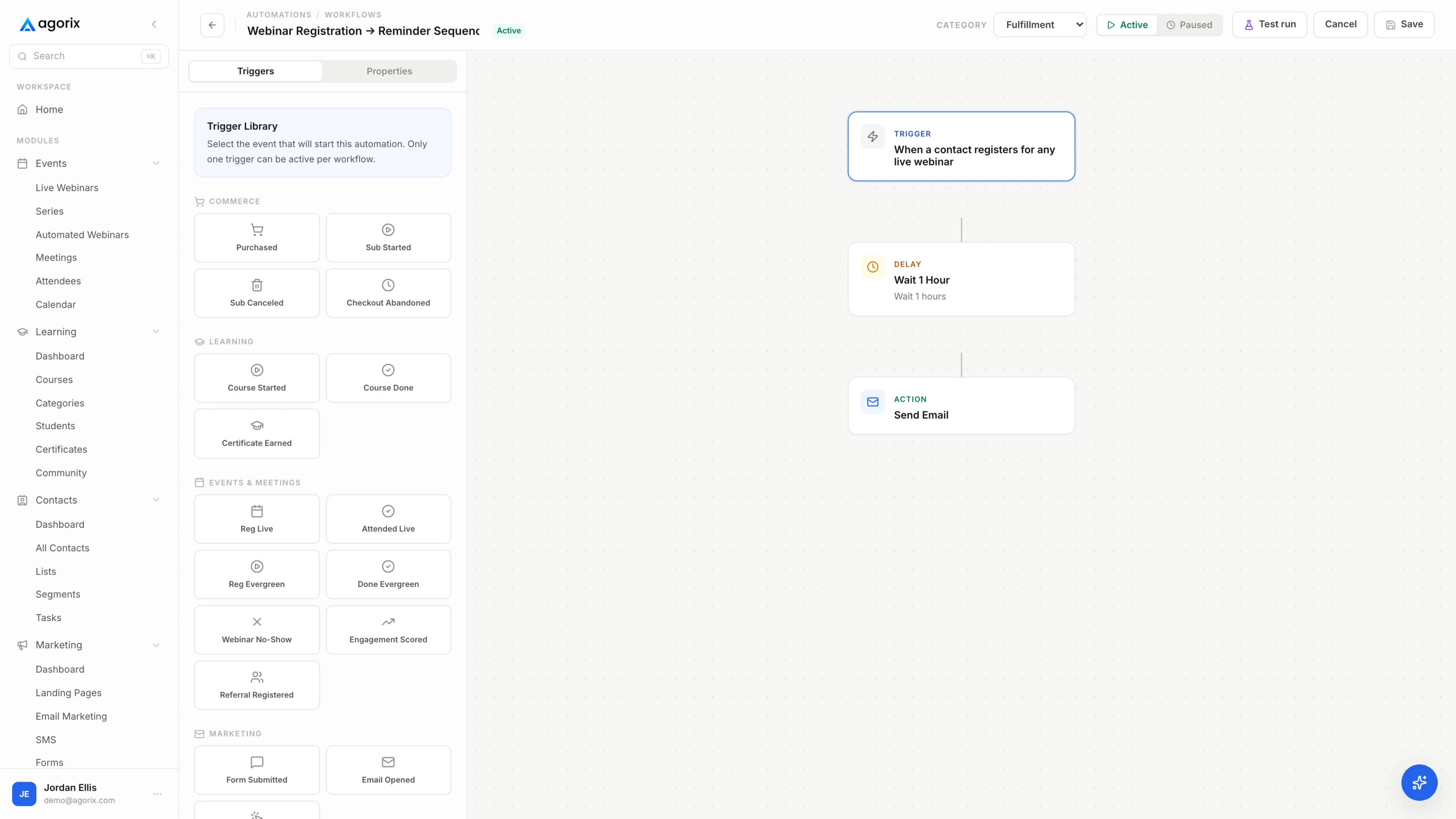
A trigger is not an email that happens to be automated. It is a condition — and the condition is the part that decides whether the message is welcome, because it decides who receives it and what they were doing a moment before.
The test takes ten seconds. Write the rule as one plain sentence, in the past tense, from the other person’s point of view: they watched to the end of the session and did not buy, they finished module two and have not opened a lesson in a week. If the sentence needs an “and also” to hold together, you have two triggers. If it describes a state of mind rather than an event — “is a hot lead”, “seems interested” — you have an opinion, and no system can fire on an opinion.
Doing it in this order changes the copy as much as the mechanics. Once the condition is written down you know exactly what the recipient just did, which means the message can refer to it plainly instead of opening with the generic paragraph that every automated email opens with. Most of what people call “personalisation” is just a trigger whose condition was specific enough to write about.
Content first is how a business ends up with nine sequences that all say roughly the same thing to roughly the same people, each fired by a condition reverse-engineered to justify a message somebody had already written. It is also why those sequences are impossible to fix: there is no way to make a message more relevant when the rule that sends it was chosen last.
Nearly every trigger worth building comes from one of five families. Knowing which family you are in tells you how much weight the signal can carry — and the last column is the one that keeps you honest.
| Family | Fires on | A fair reading | Over-reading it |
|---|---|---|---|
| Attendance | Registered, attended, arrived late, left early, did not turn up | They allocated an hour of their working day to this, or they did not | That a no-show is uninterested. The most common reason is that it was Tuesday. |
| Watch time | Crossed a marker — reached the offer, finished the recording, stopped at a known point | How much of the argument they actually heard before they left | That minutes equal intent. A tab left open scores the same as rapt attention. |
| Clicks | One specific link: the offer, the pricing page, the booking link, a lesson | Which particular thing they wanted to look at, which is more than you knew before | That a click is a decision. It is a question with the answer still missing. |
| Purchases and state | Bought, refunded, owns this already, access granted, subscription lapsed | A fact rather than an inference — the only family that needs no interpretation | Nothing, as long as you check state before you send. Most embarrassing sends are a missing state check. |
| Inactivity | An expected next action has not happened inside a window you chose | Something stopped. You know when, and you know where. | That silence is rejection. It is far more often a difficult lesson or a busy fortnight. |
Two practical consequences fall out of that table. The first is that purchases and state are the only family requiring no interpretation, which is why they belong in the qualifier of almost every other trigger — “and does not already own this” is the single most valuable condition you will ever write. The second is that inactivity is the family small businesses skip, and it is the one covering the work nobody does by hand, because nobody has ever remembered to check who quietly stopped.
A single signal is usually too blunt to write to. Watch time plus purchase state gives you the engaged non-buyer. A click plus an absence gives you someone who looked at the offer and stopped. Attendance plus inactivity gives you the person who showed up, meant it, and then let it slide. Two conditions is usually the sweet spot; by the fourth you have built something that fires for eleven people a quarter and takes an afternoon to debug.
This is the whole method. Fill in the spec, read it back as a sentence, and only then open the editor. It takes about five minutes and it is the difference between a trigger you can maintain and one you will eventually switch off because nobody remembers what it does.
Copy this into a document, one block per trigger, and keep the document. It is the only documentation this part of your business needs, and it is what turns a quarterly review from an archaeology project into a twenty-minute read.
TRIGGER   [short name someone else would understand]
WHEN      [the event, written in the past tense]
ONLY IF   [what else must be true about this person]
WAIT      [how long after the event]
DO        [one action]
STOP IF   [what cancels it before it runs]
ELSE      [what happens to everyone who fails the ONLY IF]
OWNER     [the person who reads the replies]
One more field is worth adding in your head even if it never makes it onto the page: what does this person know at the moment the message arrives? A no-show has not heard your argument. Someone who watched to the end has heard all of it and declined. A student who stalled knows exactly where they got stuck and would rather you named it than pretended not to notice. Write to that state, and the copy mostly writes itself.
A single trigger is easy. The trouble starts at the fourth, when two of them are individually reasonable and jointly embarrassing. These eight rules cost nothing to apply on the day you build something and are painful to retrofit.
This is not an edge case; it is Tuesday. The same person attends the session, clicks the offer, and hits the seven-day mark on a course they stalled in — three qualifying conditions inside one afternoon. There are three ways to resolve it and only one of them is worth a small team’s attention.
“What else could this person be receiving from us today?” It takes fifteen seconds and it catches nearly everything the priority order misses — the broadcast going out that morning, the sequence they are three emails into, the invoice, the person on your team who is already halfway through a conversation with them.
The moment you write “if they attended”, you have created the group who did not attend and left it empty. That group is almost always larger than the one you built for, and it is where most of the unclaimed value in a small business sits.
| The branch you built | The branch you just created |
|---|---|
| Attended the session | Registered, and then did not turn up |
| Watched through the offer | Left before the offer, having heard the useful half |
| Clicked the offer link | Opened, read the whole thing, did not click |
| Bought | Reached the checkout and stopped there |
| Completed the module | Started the module and stalled inside it |
| Booked the call | Was invited to book and did not |
Read the right-hand column as a list of people who did something meaningful and then heard nothing. Someone who reached your checkout and stopped told you more than almost anyone on your list, and in most small businesses the response is silence, because the automation was built for the people who completed the purchase.
What is not legitimate is the fourth option everyone reaches for: the same message with a slightly sadder subject line. The right-hand column is a different audience in a different state, not a worse version of the left-hand one, and a message that treats them as failed attendees reads exactly like what it is.
These people did the thing. The message writes itself, which is precisely why it gets built first and why it is rarely where the remaining value is.
These people did most of the thing. Nobody is writing to them, which makes an accurate message here worth more per send than anything on the other side.
One from each of the three families worth starting with. The bracketed parts are yours to replace; the intervals are working defaults rather than findings, and the note under each one explains which choices are load-bearing and which are arbitrary.
TRIGGER   Engaged non-buyer — [session name]
WHEN      The session ended
ONLY IF   Watch time passed [the point where the offer starts]
          AND has not purchased [offer]
WAIT      2 hours
DO        Send [the one email that answers the objection you
          actually heard in the room]
STOP IF   They purchase before it sends
ELSE      Left before the offer → [replay email, timestamped to
          the part they missed]
OWNER [name]This is the highest-value trigger most businesses can build, and it is two facts joined by AND rather than a score. Someone who sat through the pitch and did not act has an objection, not a lack of information. The two-hour wait exists because the message has to arrive while they still remember the room, and because sending during the session catches people who were about to buy.
TRIGGER   Clicked [offer link], no checkout
WHEN      [Offer link] was clicked
ONLY IF   No checkout started in the next 48 hours
          AND does not already own [offer]
          AND has not had this trigger in [7] days
WAIT      48 hours from the click
DO        Send [the short email naming the two questions people
          ask before they buy this]
STOP IF   A checkout is started, or they reply to a human
ELSE      Opened and did not click → nothing. Wait for a
          better signal.
OWNER [name]The click is the narrowest signal in the set and the easiest to over-read, which is why the qualifier does most of the work here. Forty-eight hours is long enough that the people who were going to act have acted, so the message lands on the ones who genuinely stopped — and short enough that they still remember clicking.
TRIGGER   Stalled after [module]
WHEN      [Module] was completed
ONLY IF   No lesson activity for [7] days
          AND [next module] has not been started
WAIT      7 days from the last activity
DO        Send [the specific help for the thing that comes next]
          AND create a task for [owner] if [high-value customer]
STOP IF   Any lesson activity happens
ELSE      Carried straight on → no message. They are fine.
OWNER [name]An inactivity trigger, which is the family people build last and get the most out of. The precision comes from where the person stopped: a message that names the specific next lesson and the specific difficulty is help, while “we noticed you have not logged in” is surveillance. The seven days is a guess you should adjust once you can see where your own students actually stall.
Notice what the three have in common. Each one has a qualifier that checks state, a stop condition that cancels it if the person acts first, an else branch that is decided rather than empty, and exactly one action. Those four properties are what make a trigger safe to leave running while you are on holiday, which is the only real test of an automation.
This is the constraint that quietly decides which triggers on this page you can actually build, and it has nothing to do with how good your automation tool is. It is about whether the signal and the qualifier can be read from the same person at the same moment.
Take design 01. “Watch time passed the offer marker AND has not purchased” needs the watch-time data and the purchase data to sit on one record. If the webinar tool holds the first, the checkout holds the second and the email tool holds neither, that condition is not a trigger — it is an export, a spreadsheet, a manual segment upload, and a twenty-four hour delay by the time anyone has done it. So the trigger you actually build is the blunter one that your weakest integration supports, which is why so many small businesses end up sending “thanks for attending” to a list that includes the people who bought.
None of this is an argument for a particular product. It is an argument for testing the condition before designing around it: pick the trigger you most want, and check whether both halves of it are visible in one place before you write the email.
“Stayed through the offer and did not buy” is one line in a workflow when attendance, watch time and the checkout live on the same customer record — and three exports and a guess when they do not. In Agorix the signal and the qualifier are read from the same story, so the follow-up runs while it still means something — see how live webinars connect.
Trigger design is enjoyable enough that it becomes a substitute for shipping. Build these three, in this order, and leave them alone for a month before adding a fourth.
Put yourself through it first. Register, do not attend, watch half, click the link, abandon the checkout — whatever the condition describes — and receive the consequence in your own inbox with your own timing. Then check the execution history forty-eight hours later and read what actually happened to five real people, not the summary count. The count tells you the trigger fired. Only the path tells you it fired for the right reason.
Then put a date in the calendar. Once a quarter, read the specs, check which triggers fired at all, and switch off the ones that fired for nobody or fired for everybody. Both are broken; only one of them is obvious.
A trigger answers “what should happen now”. It does not answer “who deserves a human today”, which is a question about accumulated behaviour rather than a single event. That is what a simple lead score is for — and a score crossing a threshold is itself just another trigger, designed the same way.
A rule that starts a message from something a person did or did not do, rather than from a date on your calendar. It has three parts: the event — attended, watched to a point, clicked a specific link, purchased, or failed to act inside a window — the qualifier that must also be true about that person, and the one action that follows. The discipline that makes them work is writing the condition as a single plain sentence before you write any copy. If the sentence needs an “and also” to hold together, you have two triggers.
Three to start, and rarely more than about ten in total. Begin with the money-adjacent trigger, the completion trigger and one inactivity trigger — the three in the last section. Every addition after that brings a conflict to resolve and something else to maintain, so the ceiling is not what your tool supports but how many rules you can still hold in your head when something misfires. Your first marketing automations covers which ones earn their place first.
Long enough that the person has finished doing the thing, short enough that they still remember doing it. Two hours after a session ends, forty-eight hours after an offer click, seven days after activity stops. Treat the wait as a content decision rather than a technical one — it determines what the recipient remembers when your message arrives, which determines what the message can reasonably say.
Decide the rule before it happens rather than after. Priority is the right default for a small team: write the order once — purchase-adjacent above engagement-adjacent above housekeeping — and let the lower-priority message be discarded rather than queued. Then add a cap on automated messages per person per week. Cooldowns stop one trigger repeating; only a cap stops six different triggers all being individually reasonable on the same Thursday.
Yes, and these are usually the most valuable triggers a small business builds, because they cover the follow-up nobody remembers to do by hand. An inactivity condition needs a window and an expected action: no lesson activity for seven days and the next module not started; invited to book and no booking within five days. It also needs a stop condition, so the message cancels itself if the person acts while it is waiting. Agorix workflows can start from meaningful inactivity as well as from actions.
No — they pay back on relevance rather than volume, so the arithmetic is simply smaller at a smaller size. What they do need is behaviour you can actually observe and qualify on, which is the real constraint. A trigger can only fire on what your system records about one person, so in a split stack the practical limit is not your imagination but whatever your weakest integration can see.
Registrations, attendance, watch time, course progress, clicks and purchases on one customer record — so a two-condition trigger is one rule rather than three exports, and the else branch is a branch rather than a gap.
14 days · $0 due today · Payment method required · Cancel before first charge and pay nothing