Skip to content
Agorix
Updated 29 July 2026

Automated webinar email sequence: eleven templates, branched on behaviour.

The always-on pack. Every send is keyed to the registrant’s own session and to how far they actually watched — the confirmation, the reminders, the three-way post-session split, their own deadline, and the way back to your nurture list. Complete emails with subject lines, the branch condition each one fires on, and the reason its timing exists.

11templates
03behaviour branches
00calendar dates

What you are taking away

  • Eleven emails you can paste into any tool today, subject lines included
  • The branch condition each one fires on, written as a rule you can build
  • The timing reason for every send, keyed to the registrant rather than a date
  • The three-way behaviour split, and what changes when you cannot read watch time
  • Deadline sends that are true per registrant and survive being tested
  • A four-email minimum for a first evergreen funnel
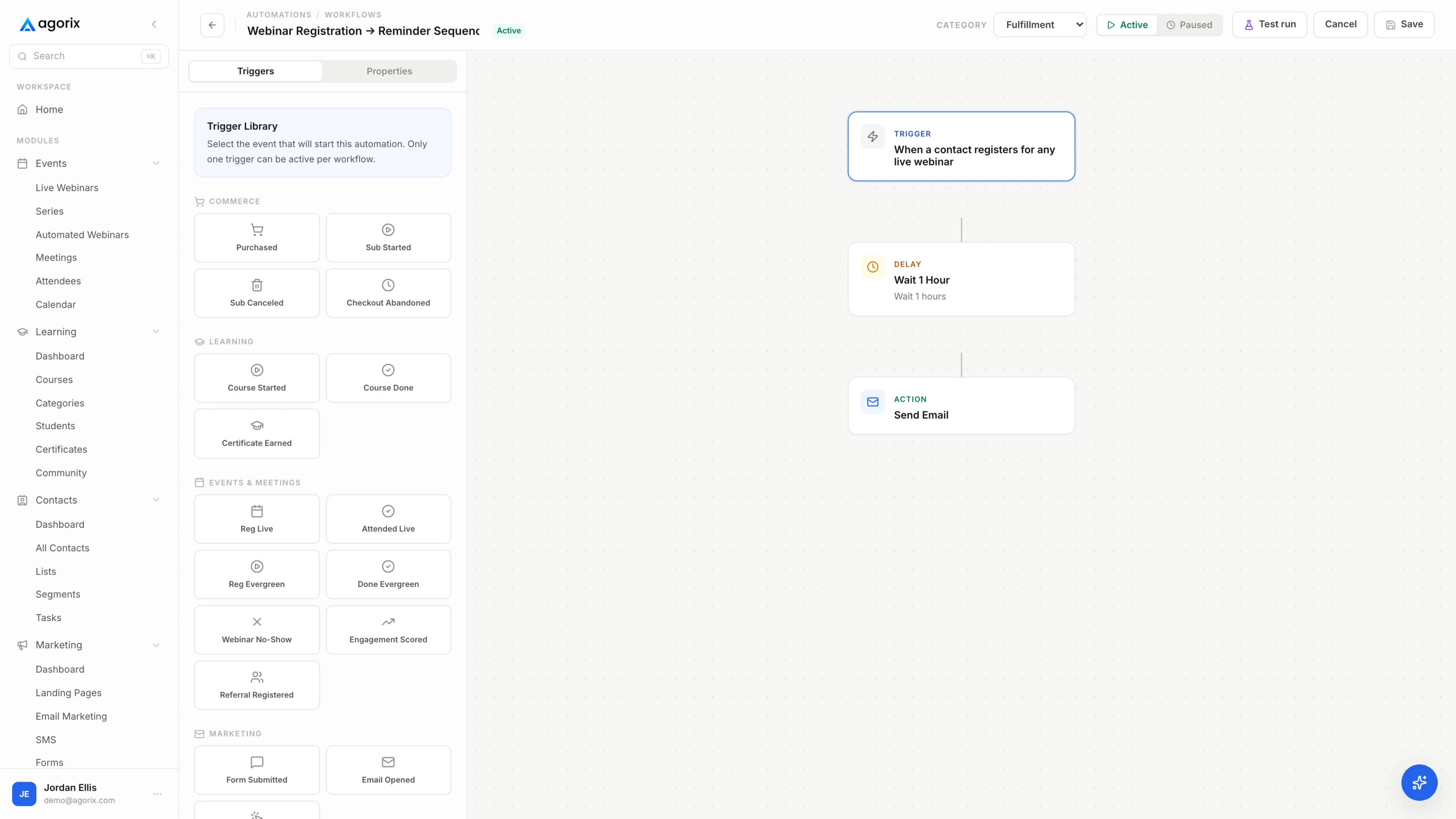
An automation builder branching a follow-up sequence on attendee behaviour.
Before you paste anything

Two packs, two clocks.

There are two webinar email sequences on this site and they are not variations of each other. They run on different clocks, which means almost every send in one is timed against something the other does not have.

The live pack

One date, everybody at once

A campaign around a single session: invitations counting down to a fixed date, reminders positioned against it, and one follow-up split afterwards. Every send has a calendar date, because every registrant shares the same one — the eleven live campaign emails are a separate pack.

This pack

One registrant, their own clock

An always-on funnel where a thousand people are at a thousand different points at once. Sends are keyed to the session that registrant chose, how far into it they got, and when their own window closes. Not one of the eleven below carries a date.

Every email has a branch condition

Each template below carries a Fires on line: the rule that decides whether that registrant gets it. Some are trivial — registration completed, ten minutes before their session. Three depend on behaviour the funnel has to be able to read: whether they joined, how far they watched, whether they bought. Build the conditions first and write the copy second, because a beautifully written early-exit email that goes to everybody is worse than not sending it.

The brackets are the work

Everything in [brackets] is yours to replace, including the parts that read as instructions — they are there because a template that writes your teaching for you produces eleven emails saying nothing. Swap them for your tool’s merge fields where one exists; field names differ by platform, so these are written in plain brackets rather than any product’s syntax.

The whole pack

Timings are a starting cadence to adjust against what your own funnel does, not a benchmark to hit. The full build these sends plug into — the recording, the schedule, the deadline and the checkout — is in the automated webinar setup guide.

WhenEmail
On registrationConfirmationTheir session, their timezone, the replay policy.
Session −1dOne useful thingSuppressed for anyone who booked inside 36 hours.
Session −3hSame-day reminderFriction removal, plus the offer of a later session.
Session −10mStarting shortlyHighest yield. Relative to their session, never a date.
Session +30mWatched through the offerThe argument restated, and their deadline in writing.
Session +30mLeft before the offerHands back the part they did not reach.
Session +2hRegistered, never joinedLeads with the next session, not the replay.
Deadline −24hOne objection, answeredCarries an answer rather than a countdown.
Deadline −3hFinal hoursWhat changes at the deadline, stated truthfully.
Deadline +1hThe window closedMakes every future deadline you set credible.
Deadline +3dBack to the listThe handoff into ordinary nurture.

Eleven templates, plain text, no merge syntax. Copy them one at a time, or take the whole pack as a single block and cut it down in your editor.

Registration → −10mBefore their sessionBlock 01 / 03

Four sends between registering and watching.

In an always-on funnel the registrant picks the gap. Somebody books five days out and has five days to change their mind; somebody else books a session starting in twenty minutes. The same four emails cannot serve both, which is why two of them carry suppression rules rather than send times.

The order is by the gap each one closes. The confirmation makes the session an appointment, the day-before email argues the hour is worth spending, the same-day email removes the reasons to skip, and the ten-minute email answers “is it now”.

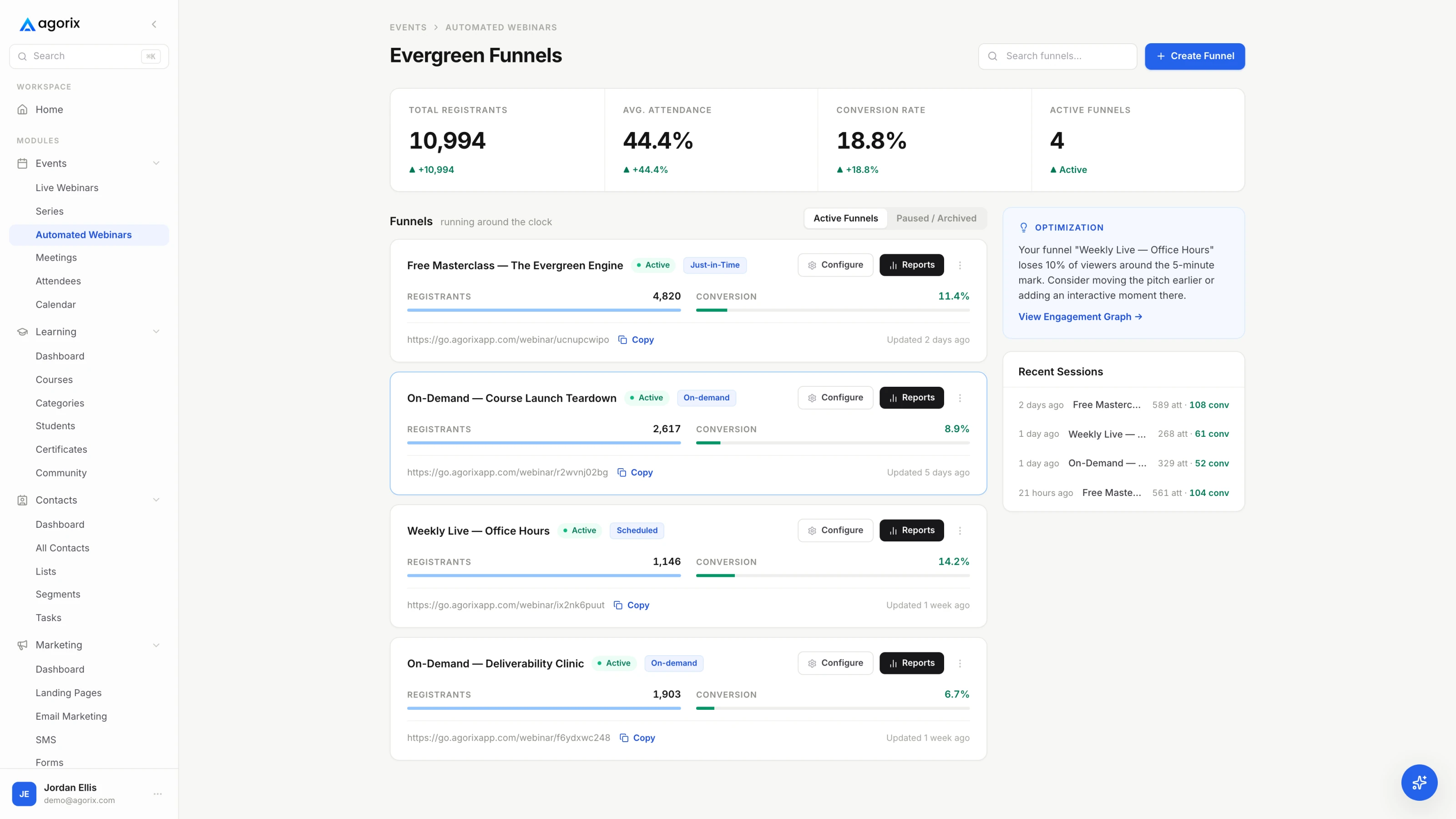
An automated webinar console showing scheduled evergreen sessions and viewer progress.
Fig. 01Every send in this block is measured from the session in that row, not from a date on your calendar.
On registration

Confirmation for the session they chose

01 / 11
SubjectYou are registered: [Session title], [Day] [Time] [Timezone]
AltYour session is [Day] at [Time]
Fires onRegistration completed. Sends immediately, carrying the date, time and timezone of the session that registrant selected.
[First name] —

You are registered. Your session:

What:   [Session title]
When:   [Day, Date] at [Time] [their timezone]
Where:  [Join link]
Add it: [Calendar link]

It runs [length] minutes. By the end you will be able to [the
one-sentence outcome, in the same words the registration page used].

[Replay policy, plainly: “The replay is available for [window] after
your session,” or “There is no replay on this one.” Answering it here
is the difference between answering it once and answering it forty
times by reply.]

If that time stops working, move to a later session here:
[Reschedule link — cut this line if you do not offer one.]

[Your name]
Why it is sent then

The most-opened email in the pack, because it is the one people go looking for. It is also the only email that has to prove the session is a real appointment rather than a link they will find again later — which is why the chosen time, in their own timezone, is the first thing in it rather than the last.

Change it for
  • CoachAdd one line inviting a reply with the situation they want covered. Those replies are your objection list before anyone has watched anything.
  • Course creatorAsk one question with a link — “which of these three is the one you are stuck on?” — and you have segments before the session starts.
  • SaaSSay whether anything needs installing and whether a work network will block it. Answer it before IT does.
Their session −1d

One useful thing

02 / 11
Subject[The useful thing], before your session tomorrow
AltSomething you can use before we meet
Fires onTheir session is more than 36 hours away at the point of registration. Anyone who booked a session sooner than that skips this email — suppressed, not delayed.
[First name] —

Your session is tomorrow at [Time] [their timezone]. Before then, here
is something small you can use today.

[The teaching. Three to six sentences, or a short numbered list, and it
has to be complete — something the reader can finish this afternoon
without attending anything. If you cannot give away one complete idea,
the session probably does not have enough of them.]

That is one piece of what the session covers. It takes the same idea
through [the larger thing this is a piece of].

Your link: [Join link]

[Your name]
Why it is sent then

This is the email that buys the hour back. The gap between registering and watching is chosen by the registrant, not by you: somebody who booked five days out has had five days to reconsider, and somebody who booked a session starting in twenty minutes has not. This email exists for the first person and must never reach the second, which is the whole reason it carries a suppression rule rather than a send date.

Change it for
  • CoachA short diagnostic — four questions and what each answer means — beats a how-to here. It makes the problem concrete for them specifically.
  • Course creatorSend the shortest complete lesson you have. Not a preview of it: the actual thing.
  • SaaSA configuration or a checklist your team walks people through anyway. Useful whether or not they ever buy.
Their session −3h

Same-day reminder

03 / 11
SubjectToday at [Time] [Timezone] — your link
AltYour session is today
Fires onThree hours before their session, if no join has been recorded yet. Skipped entirely for anyone who registered inside that window.
[First name] —

Your session is today at [Time] [their timezone].

Join:  [Join link]
Bring: [what to have open]

The two questions I always get:

Is there a replay?          [Yes, for [window], or no. Plainly.]
Do I need to install
anything?                   [Yes and what, or no.]

It starts on time and runs [length] minutes. [If you offer one: “If
today no longer works, move to another session here: [Reschedule
link].”]

[Your name]
Why it is sent then

The day-of email is friction removal, not a nudge — every unanswered logistical question is a reason to skip. The reschedule line is the part a live campaign cannot have: a missed session in an always-on funnel is not a lost registration, it is somebody who needs a different time, and offering it costs you nothing.

Change it for
  • CoachAdd the one-line agenda. A high-ticket audience wants to know the session is structured before giving up an hour.
  • Course creatorIf there is a workbook, link it here — having it open is a commitment device.
  • SaaSName who else from their side should be on it. Multi-stakeholder attendance is decided hours before, not minutes before.
Their session −10m

Starting shortly

04 / 11
SubjectStarting in ten minutes — [Session title]
AltWe are about to start
Fires onTen minutes before their session, if no join has been recorded. Fires against the session, never against a calendar date.
[First name] —

Your session starts in about ten minutes.

[Join link]

If the link gives you any trouble, reply to this and someone will
answer.

[Your name]
Why it is sent then

Two lines and the link. It is the highest-yield send in the pack and the one most often missing, because it is structurally impossible to schedule by date — a thousand registrants across a week of session times means a thousand different ten-minute marks. Anything else in this email is a reason to put it aside and come back to it, which is the exact behaviour it exists to prevent.

Change it for
  • CoachLeave it exactly as it is. A short email from a person is the point.
  • Course creatorLeave it exactly as it is.
  • SaaSThe reply-to needs to reach a human during business hours in the timezones you offer sessions in. This is the email that surfaces access problems.
+30m → +2hThe behaviour splitBlock 02 / 03

One session, three behaviours, three emails.

This is the block that separates an automated sequence from a scheduled one. All three people registered for the same thing; what they have actually seen of your argument is completely different, and sending them the same email throws away the only new information the session produced.

Watched through the offer, left before the offer, never joined. The conditions have to be mutually exclusive and there has to be a default for the people they miss — a join with no watch data, a session that did not record properly. Send the default the no-show email rather than nothing.

One rule sits above all three: anybody who bought exits every branch at the moment of purchase, including the deadline sends in the next block. In a live campaign a stray discount email is embarrassing. In an always-on funnel it goes out at three in the morning, forever, until somebody notices.

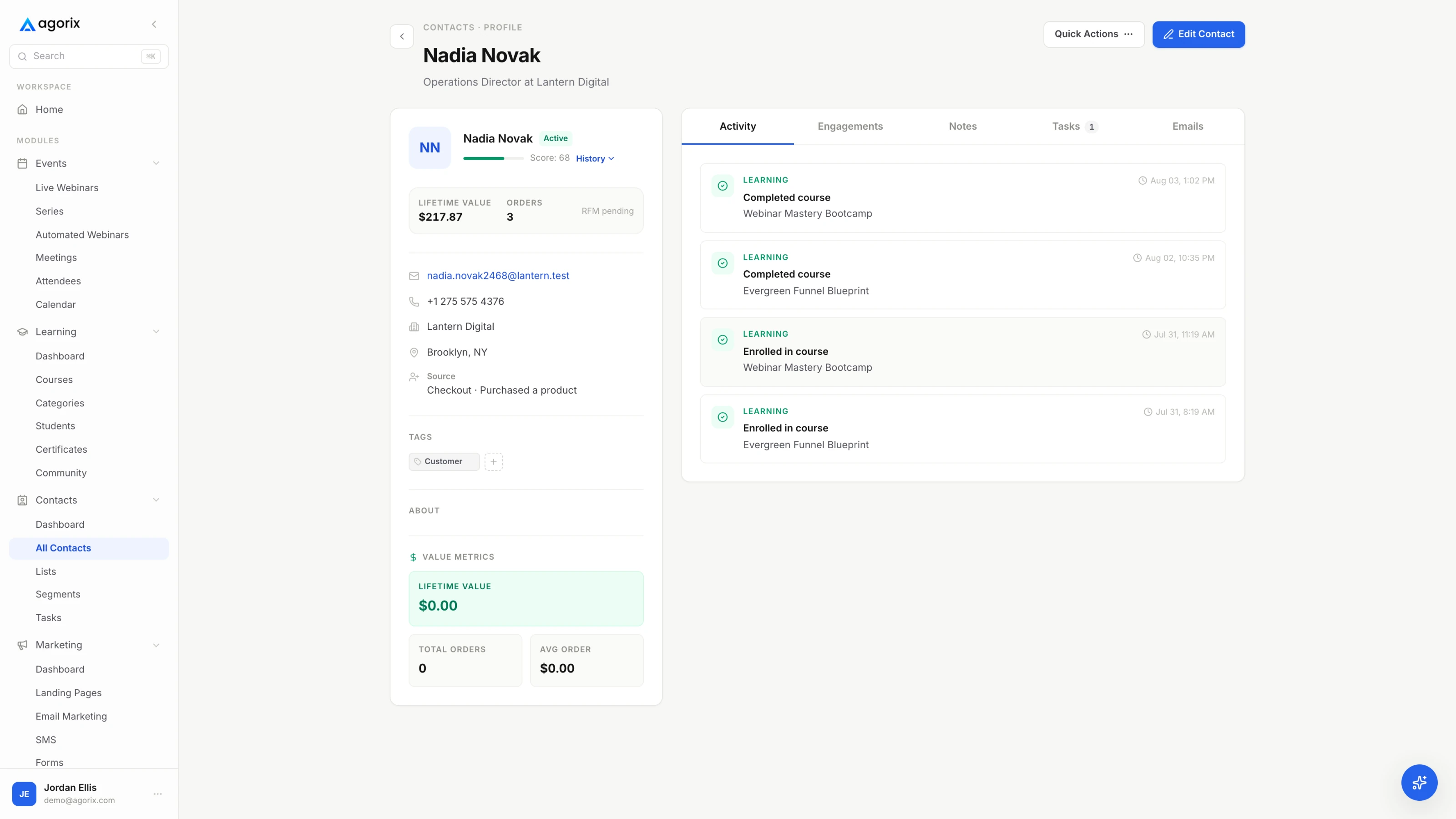
A contact record showing registration, watch time, offer clicks and purchase history on one timeline.
Fig. 02The branch condition is a fact about a person. Whatever you build it in, the email system has to be able to read that fact at the moment it sends.
Their session +30m

Watched through the offer

05 / 11
SubjectEverything from your session, plus [what you promised]
AltThe [resource] I mentioned at the end
Fires onJoined, watch time passed the offer, no purchase. Anyone who bought leaves the sequence at the purchase instead of receiving this.
[First name] —

You stayed to the end of [Session title] today, which is not nothing.
Thank you for the hour.

Everything from it, in one place:

[Resource]: [Link to the worksheet, template or slides you promised]
[Offer]:    [Offer link] — [what it is, in one clause]
            Open to you until [their deadline: the date, the time and
            their timezone, written out].

[One honest paragraph on the offer: what doing this alone looks like,
and what changes if you do it with help. Two to four sentences. You
made this argument at the end of the session — make the same one here,
in the same words.]

If you are weighing it up, reply with the part you are stuck on. A
reply gets an answer from me, not another sequence.

[Your name]
Why it is sent then

They have seen the whole argument, so this email is allowed to be about the offer — its job is to reactivate the case rather than re-teach it. It is also the first place their deadline appears in writing, which is why the deadline is written out in full rather than described as a number of hours: a date somebody can check is a deadline they believe.

Change it for
  • CoachReplace the offer paragraph with the single next step — book the call, apply, reply. High-ticket does not close in an email.
  • Course creatorState the deadline exactly as the session stated it, and then hold it. Extending it teaches your list that your deadlines are decorative.
  • SaaSPut the trial or sandbox link beside the offer. The gap between “that was useful” and “I tried it” closes today or not at all.
Their session +30m

Left before the offer

06 / 11
SubjectThe part you did not get to
AltYou stopped at [the section] — here is the rest
Fires onJoined, watch time stopped before the offer timestamp, no purchase. The condition is watch time, so it is the branch that disappears if your stack cannot read it.
[First name] —

You were with me for about [watch length] of [Session title] before
you had to go.

The part you did not reach was [the specific thing that comes after
the point most people leave — name it, do not tease it].

Two ways to pick it up:

Carry on from where you stopped: [Replay link, with the timestamp if
your tool can carry one]

The short version:              [Two to five sentences that actually
deliver the idea. This email has to be worth reading by somebody who
never opens the replay.]

[If there is an offer: one sentence naming it, its deadline and the
link. One. They left before the argument, so a full pitch here has
nothing underneath it.]

[Your name]
Why it is sent then

The segment most often merged into the no-show list, and the one carrying the most information. These people gave you real minutes and stopped at a specific place — which is a fact about your presentation as much as about them. Send this one for a month and the pattern in where people leave will tell you which section to rewrite.

Change it for
  • CoachIf they left before the offer, they left before the invitation. Make this email about the missing idea and put the invitation in the deadline emails.
  • Course creatorName the module the missing section maps to. It is the cleanest proof that the curriculum is more than the free hour.
  • SaaSSend the artefact rather than the replay if the artefact is faster — the migration path, the security page, the integration list.
Their session +2h

Registered, never joined

07 / 11
SubjectYou missed it — the next session, or the replay
AltTwo ways to catch [Session title]
Fires onRegistered, no join recorded for their session. Sends two hours after the session they missed.
[First name] —

You registered for [Session title] at [Time] and did not make it. That
happens.

Two options, whichever suits:

Take the next session:  [Registration or reschedule link — the next
available time]
Watch the replay:       [Replay link] — available until [deadline,
only if it is true and you will hold it]

It runs [length] minutes. If you only have ten, start at [timestamp] —
that is [the part that matters most].

[If there is an offer: one sentence naming it, its deadline and the
link. Not the full argument; they have not seen the teaching yet.]

[Your name]
Why it is sent then

The no-show in an always-on funnel has an option the live no-show does not — another session, starting soon — so lead with it rather than with the replay. The timestamp is the working part of the fallback: it turns an hour-long obligation into a ten-minute one, which is the difference between watched and archived.

Change it for
  • CoachAsk which it was, the time or the topic. The answers tell you which of the two to change, and they arrive from people who were interested enough to register.
  • Course creatorGive the replay a genuine window. An open-ended replay gets watched at the same rate as no replay at all — later.
  • SaaSOffer a shorter live alternative if you have one. A fifteen-minute call beats a sixty-minute recording for somebody who already lost the hour once.
Where a tool decision changes the plan

Three of these eleven need to know how far somebody watched.

The split only works if the email system can read the watch time, and the ten-minute send only works if it fires against the registrant’s own session. In Agorix the session, the watch-time milestones, the offer exposure and the sequence sit on one customer record — see how evergreen webinars work.

Start your 14-day trial 14 days · $0 due today · Payment method required · Cancel before first charge and pay nothing
Deadline −24h → +3dTheir deadline, and the way outBlock 03 / 03

Four sends on a clock that belongs to the registrant.

A live campaign closes one cart on one evening and everybody feels it at the same time. An evergreen funnel closes a different window every hour of every day, and nobody outside it can tell those windows apart — which is exactly why the mechanics have to be real.

The deadline in the email and the countdown on the page must be the same object rather than two settings that agree today. Write the close time out in full — date, time, timezone — instead of describing it as a number of hours, because a time somebody can check is a deadline somebody believes. The deadlines guide covers what makes one hold up when it is tested.

The block ends with two emails most funnels do not have: the one confirming the deadline held, and the one saying where the registrant goes next. Both exist for the same reason — the funnel will run for years, and what it teaches people about your deadlines and your list compounds for exactly that long.

Their deadline −24h

One objection, answered

08 / 11
Subject[The objection], specifically
AltBefore your window closes tomorrow
Fires onTwenty-four hours before that registrant’s window closes, no purchase. Every registrant is on their own clock, so this send has no calendar date attached to it at all.
[First name] —

Your window on [offer name] closes tomorrow at [Time] [their
timezone].

Before it does, the question that comes up most: [the objection you
actually hear, named plainly].

[Two to five sentences answering it honestly. If the honest answer is
that this is not the right move for people in a particular situation,
say so and name the situation. The people that disqualifies were never
going to buy, and everybody else will trust the rest of the email
more.]

[Offer link]

If it is a different question, reply and ask it. I would rather answer
it than have you decide on a guess.

[Your name]
Why it is sent then

A deadline email that only repeats the deadline gets read as pressure. This one carries an answer, which means it can only be written after you have listened — the objection has to be one you genuinely hear, not one you invented to have something to rebut. It is the highest-value email in the block for exactly that reason, and the easiest to waste.

Change it for
  • CoachUsually price or timing. Answer the one you actually hear, and make replying easier than deciding.
  • Course creatorUsually “will I finish it.” Answer with the structure and the support, not with more curriculum.
  • SaaSUsually migration or team buy-in. Send the specific artefact, not another demo invitation.
Their deadline −3h

Final hours

09 / 11
SubjectCloses for you at [Time] today
AltThree hours left on [offer name]
Fires onThree hours before their window closes, no purchase.
[First name] —

[Offer name] closes for you at [Time] [their timezone] today, about
three hours from now.

What it includes:

— [Inclusion one]
— [Inclusion two]
— [Inclusion three]

[Offer link]

After [Time], [exactly what happens: the price returns to [X], the
bonus comes off, the link stops working. Write the true one, and only
the true one.]

[Your name]
Why it is sent then

Short, factual, no new argument — anybody still reading has heard the argument twice. The only line that matters is the one describing what actually changes at the deadline, and it has to be literally true, because some proportion of your list will come back afterwards to check whether it was.

Change it for
  • CoachIf the offer is a call rather than a purchase, close the calendar rather than a cart, and say which week you are actually booking into.
  • Course creatorName the bonus that comes off, not the discount that ends. A removed thing is easier to verify than a changed number.
  • SaaSIf nothing genuinely changes at the deadline, delete this email rather than inventing a consequence for it.
Their deadline +1h

The window closed

10 / 11
SubjectThat one closed — what is still available
Alt[Offer name] closed at [Time]
Fires onOne hour after their window expires, no purchase.
[First name] —

[Offer name] closed for you at [Time] today, so [the bonus / the price
/ the link] from the session is no longer available. That is the
honest version rather than a quiet extension.

Two things that are still true:

[What remains — the replay if it is genuinely still up, a
lower-commitment option, or the next thing you would honestly
recommend they do instead.]

[How to reach you if timing was the only problem: “reply and tell me,
and I will let you know when this runs again.”]

[Your name]
Why it is sent then

The email that makes every future deadline you set credible. Sending nothing after a deadline wastes the moment; sending an extension teaches your list a lesson about you that they do not forget. This one does the third thing: it confirms the deadline held, and gives the people who missed it somewhere to go.

Change it for
  • CoachOffer the next intake date if there is one. A closed door with a named next date reads as a business, not a tactic.
  • Course creatorKeep the standard-price link available and say plainly that the session bonus is what expired.
  • SaaSPoint at the self-serve path. The deadline was about the incentive, not about whether they can use the product.
Their deadline +3d

Back to the list

11 / 11
SubjectLast one about [Session title]
AltWhat you will hear from me next
Fires onThree days after their window closed, no purchase. The final send in the funnel — the registrant returns to your general nurture schedule after it.
[First name] —

Last one about [Session title]. From here you will hear from me on
[what your general list genuinely gets: the weekly note, the monthly
letter, new sessions — whichever is true].

If the session was useful, the next most useful thing is probably
[the specific article, tool or resource that follows on from it].

[Link]

And if [the problem the session addresses] is still on your list in
[a realistic timeframe], reply and say so. I would rather hear it than
guess.

[Your name]
Why it is sent then

The handoff, and the email nobody builds. It prevents two failures at once: registrants stranded in a finished branch receiving nothing at all, and registrants quietly dropped back into the top of the same funnel to be invited to the same presentation as though it were new. Say where they are going, then actually send that instead.

Change it for
  • CoachAsk permission to check back in a set number of weeks, then set the task. That is a follow-up, not a sequence.
  • Course creatorPoint at a lower-priced product or a free cohort. The evergreen funnel is one offer, not the whole catalogue.
  • SaaSHand them to the product newsletter or the changelog, and stop sending session invitations for a defined period.
Mechanics

Seven things that decide whether any of this lands.

The copy is the visible part. These are the settings around it, and in an always-on funnel a wrong setting does not fail once — it fails for every registrant until somebody goes looking.

  1. Every send is relative to their session. This is the one structural difference from a live campaign, and it decides everything else. Not one of these eleven has a date on it. If a send in your build has a date, it belongs to a different pack.
  2. Timezones come from the registrant. Write “[Time] [their timezone]” everywhere and let the tool resolve it. An always-on funnel collects registrants from every region you advertise in, and time arithmetic is a leading cause of no-shows and the cheapest one to fix.
  3. Buyers leave every branch at the purchase. A deadline email arriving after somebody paid is the worst message in the funnel, and in an always-on sequence it will happen at three in the morning while nobody is watching. Build the exit before you build the branches.
  4. One branch per registrant, plus a default. The three post-session conditions have to be mutually exclusive, and there has to be somewhere for the people your conditions miss — a join with no watch data, a session that failed to record. Send the no-show email to that default rather than nothing.
  5. One deadline, one source of truth. The countdown on the page and the time in the email must be the same object, not two settings that agree today. Two clocks drift, and the one your registrant checks is whichever one contradicts you.
  6. Do not write a recording as though it were live. Anything that only makes sense live — a name in chat, “great question just now”, a hand-raise — is a claim somebody eventually catches. The sessions can be scheduled, timed and reminded exactly as above without a single sentence pretending the presenter is present.
  7. One from-name, and a reply-to a human reads. The confirmation and the ten-minute email both invite replies, and both will get them for as long as the funnel runs. A no-reply address on those two throws away a permanent stream of the objections you would otherwise pay to research.
For a first evergreen funnel

If you can only build four, build these.

Eleven is the full funnel, not the minimum. Four sends cover the moments that matter most, and four built properly beats eleven built on conditions you cannot verify.

  1. The confirmation. Their session, their timezone, the join link and the replay policy. It is the email people go back to.
  2. The ten-minute email. Fired against their session. The highest-yield send and the one a date-based tool cannot produce.
  3. One post-session email, split at least two ways. Joined and not joined. Add the watch-time branch later, when you can read watch time reliably.
  4. One deadline email. Timed against their own window, with the close time written out in full — and the window actually closes.
Common questions

Six questions about the always-on pack.

How is an automated webinar email sequence different from a live one?

The clock. A live campaign runs on the calendar: one session date, and every send positioned around it for everybody at once. An automated sequence runs on the registrant — their chosen session, their watch time, their deadline — and not one of the eleven emails here carries a date. That is why reusing the live campaign pack quietly breaks: a reminder written for an afternoon session arrives at breakfast for the person who booked the earliest slot.

How many emails should an automated webinar sequence have?

Eleven covers the full funnel: four before the session, the three-way behaviour split after it, and four on the deadline clock ending in the handoff back to nurture. That is a maximum rather than a target. For a first evergreen funnel, send four — the confirmation, the ten-minute email, one post-session email split at least between joined and not joined, and one deadline email. Running four properly beats running eleven badly.

What should the post-webinar split branch on?

Three behaviours: watched through to the offer, joined but left before the offer, and registered but never joined. They need different emails because they have seen different amounts of the argument — an offer-led email to somebody who never watched has nothing standing under it. Then one rule on top of the three: anybody who bought exits every branch at the moment of purchase, including the deadline sends.

How do I handle the deadline in an automated sequence?

Per registrant, from a single source of truth. Each person gets a window that starts at their own session and ends at a time you can write out in full, and the countdown on the page has to be the same object as the time in the email rather than two settings that happen to agree today. Then hold it, and send the after-the-deadline email confirming that it held. Evergreen webinar deadlines works through the mechanics that survive being tested.

What if my tool cannot branch on watch time?

Fall back to two branches, joined and not joined. You lose the early-exit email — the one that hands back the specific part somebody missed — and you lose the pattern in where viewers stop, which is the most useful diagnostic an evergreen funnel produces. The sequence still works. It just stops telling you which section of the presentation to rewrite.

What happens when the sequence ends?

Say where they are going, then send that. The two failure modes are stranding registrants in a finished branch where they receive nothing at all, and dropping them back into the top of the same funnel to be invited to the same presentation as though it were new. The last email in this pack does the handoff explicitly, and the maintenance checklist is how you find out a year later whether it is still doing it.

Keep going

Where these emails plug in.

From templates to a funnel that branches itself

You have the emails. The branches need the behaviour.

The session each registrant chose, how far they watched, whether they reached the offer, their own deadline and the purchase — on one customer record, so the sends that depend on all of it fire without an export standing in the middle.

14 days · $0 due today · Payment method required · Cancel before first charge and pay nothing