Skip to content
Agorix
Updated 29 July 2026

Webinar engagement ideas: every answer is a signal.

Polls, chat prompts and question queues timed against the session arc — with what each one tells you about who to write to on Tuesday. Engagement is data, not decoration: if an answer cannot change what you say next or who you send what to, it is not worth its minute.

06prompts on the clock
09signals mapped
14run-sheet items

What you will have at the end

  • One test that tells you whether an engagement idea is worth its minute
  • The first-five-minutes poll, written three ways, and what each answer changes
  • The obstacle prompt that hands you your follow-up copy in their words
  • Why questions belong in a queue and chat belongs in chat
  • Six interactions timed against the session arc, and the two minutes to leave alone
  • What every signal means for who you write to, and what to do when nobody answers
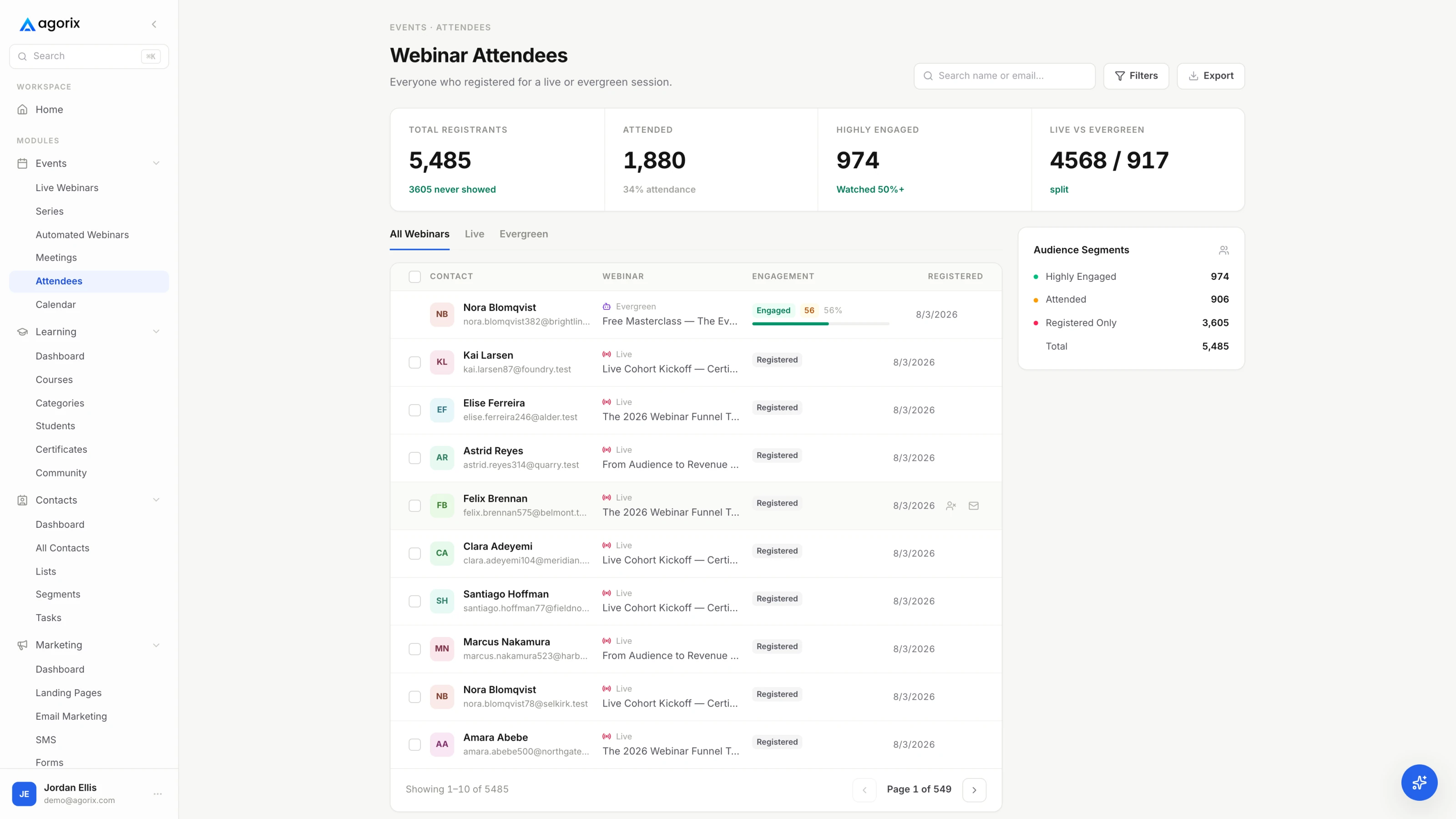
An attendee list showing registrations, attendance and engagement for each person, with audience segments alongside.
WhyData, not decoration

If the answer cannot change anything, do not ask the question.

Engagement advice is usually a list of tactics sorted by how fun they sound. The useful sort is different: each interaction is a question you are asking a room, and it earns its minute if the answer changes what you say next, what you send afterwards, or who you send it to.

That test is stricter than it looks. A word cloud of everybody’s home town is genuinely warm and produces nothing. A poll asking which of three situations somebody is in takes the same fifteen seconds and hands you a segment, a callback to use in the teaching, and the opening line of one of the follow-up emails. Same cost, completely different return.

Three questions before you use any of them

  1. What will I do differently if the answer is A rather than B? If the honest answer is nothing, the prompt is decoration. Keep it only if the room genuinely needs waking up, and know that is what you are spending the minute on.
  2. Where does the answer land when the room closes? If it lands in a chat log nobody exports, you have run an activity rather than collected a signal. Decide the destination before the session, not while you are trying to close the room down.
  3. Can somebody answer it in four seconds, on a phone? Half the room is half-listening at a desk. Anything that needs a paragraph, a calculation or hunting for a widget gets answered by the two people who were always going to answer.

Interactions also cost the room’s attention, not just your clock, so budget them like minutes. Six deliberate moments in an hour is plenty; fifteen turns a session into a workshop nobody signed up for and pushes the teaching into the time you needed for the offer.

0:00 → 5:00The first pollPrompt 01 / 03

The first poll is not a question. It is a permission slip.

A room decides in the first few minutes whether it is in a broadcast or in a room. Asking something answerable before the teaching starts settles that question while the stakes are low — and a room that has typed once types again.

Ask it inside the first five minutes, before the first idea rather than after it. Ten minutes in, people have settled into watching, and watching is a hard habit to interrupt politely.

What makes a first poll worth its fifteen seconds

  • It is about them, not about you. “Where are you with this” beats “have you read my newsletter”. The first tells you how to teach the next thirty-five minutes; the second tells you nothing you can use.
  • Three options, and one is honest for a beginner. If every option implies competence, the people who most need the session quietly do not answer — and they are the ones whose answer would have changed your emphasis.
  • The answer maps to a follow-up segment. Write the poll and the follow-up split at the same time. If you cannot name the email each answer leads to, you are running a warm-up rather than a poll.
  • You say the result out loud. “Most of you said [answer], so I am going to spend longer on [the thing that follows from it]” is the payoff. It is also the only reason anybody answers the second poll.

Three that work

  1. Where are you with [the thing] today? Not started · Started and stalled · Running it and want it working better. Segments by stage, which is the split most follow-up sequences actually need.
  2. What brought you tonight? Three specific problems, named the way your audience names them. Never “to learn more”. The winning option is the subject line of the recap email.
  3. How are you handling [the task] right now? By hand · With something that half works · Not at all. Tells you which comparison you are quietly making for the rest of the hour.

Keep the where-are-you-joining-from question for the arrivals loop, where it is free. It warms a room beautifully and tells you nothing, so it should not be spending a minute of the actual session.

36:00The obstacle promptPrompt 02 / 03

One prompt hands you your follow-up copy, in their words.

Ask a room to type the one thing that is actually in the way and you get back the objections you are about to answer, phrased the way the people with those objections phrase them. You cannot guess that phrasing, and the phrasing is the asset.

It works at either end of the teaching, for different reasons. Early, it warms the room and tells you which of your three ideas to lean on. Late — at the end of the last teach block, just before the transition — it surfaces the objections while you still have the offer block to answer them in, and it puts the room in a participating mood ninety seconds before you ask for something.

Before I do the last one, a question for you — and I do read
these.

Type the one thing that is actually in the way of you
[the outcome you have been teaching towards]. One line. Not
the polite version.

For example: “[a real, specific, slightly awkward obstacle —
‘I do not have a list yet’, ‘I have three half-finished
versions of this’]”.

[Wait. Count to ten in your head. Then read three out loud,
by name, and answer one of them properly.]

Why open text beats a poll here

A poll can only return the options you thought of, and the objection you have not thought of is the one costing you sales. Open text is harder to process and worth the trouble exactly once per session — which is why this is the only open-text prompt on the list.

Three rules

  • One line, one question. “What is in the way, and what have you tried, and what is your budget” gets you three-sentence answers from two people. One question gets you thirty one-line answers, which is the useful shape.
  • Give an example answer. It sets the format and the level of honesty. An example that is slightly awkward gives people permission to be specific rather than diplomatic.
  • Answer at least one properly, live. Reading three aloud and answering one is what makes the fourth person type. Collecting obstacles and moving on teaches the room that the prompt was a formality.

Then keep them. Those lines become the objection email’s subject line, the “who this is not for” slide in the next session, and the section of the registration page that was missing. The engaged non-buyer email is written almost entirely out of this prompt’s answers.

OngoingQuestions in a queuePrompt 03 / 03

Chat is a conversation. Questions are a queue.

Running both in the same window fails in both directions. In a busy room the good question scrolls past between two “hello from Manchester”s. In a quiet room the question that arrived at minute nine gets answered at minute fifty-five, by which point its author has left.

A queue does four things chat cannot: it can be sorted, it can be marked as answered, it can be pre-loaded before the session, and it still exists after the room closes. If your tool has a separate questions feature, use it. If it does not, run the queue by hand — a moderator, a document, and a pinned message telling people that questions go in chat starting with “Q:”.

Chat

The room talking

Reactions, one-word poll answers, the checkpoint at the end of each teach block, the link when you post it. Scrolling is fine here; nothing in chat needs to survive the session except the obstacle answers, which you capture deliberately.

Queue

The questions

Pre-loaded from registration replies, added to throughout, worked through in the last ten minutes, and read afterwards. Every unanswered item is a follow-up email, a slide for next time, or a paragraph the registration page was missing.

How to work the queue live

  1. Ask for questions early and often. “Whenever it occurs to you, not at the end.” Questions saved for the end mostly do not get asked; the person talks themselves out of it somewhere around minute thirty.
  2. Start from the queue, not the newest message. You picked the first question because most of the room is thinking it. Answering whatever arrived last hands the session’s ending to whoever types fastest.
  3. Read the name and the question out loud. The people not typing are deciding whether their question is stupid. Hearing someone else’s taken seriously is what settles it, and it is the cheapest way to open the floor.
  4. Answer objections in public, as objections. The room is deciding alongside the asker. An honest answer that disqualifies some people makes every other answer more credible.
  5. Park the ones that need your eyes on their setup. “That one is specific to you — [the next step].” Said once it is helpful; said five times it is a sales tactic and the room hears it as one.

Questions about price, timeline and implementation are a different category from questions about the teaching. They are what people ask once they have privately decided the thing works, which makes them the best reason to route somebody to a conversation rather than into a sequence.

0:00 → 60:00Timed to the arc

Six moments, and one gap you leave alone.

Engagement fails more often from timing than from content. The same poll is a permission slip at minute four and an interruption at minute forty-one. This is the arc from the pillar guide with the interactions placed on it.

WhenWhat you askSignal
T−5mArrival prompt while the room fills: one word, or the city you are joining from. Free, warm, and worth nothing afterwards — which is fine, because it is not on the clock.Warm-up
4:00Poll one. Where are you with [the thing] today? Three options, one of them honest for somebody who has not started.Segment
12:00Checkpoint at the end of the first teach block: “put a 1 in the chat if this is the part you came for, or a question if it is not clear.”Attention
20:00Poll two, written so the answer changes what you emphasise for the rest of the session — and then visibly changing it.Emphasis
28:00Open the floor briefly: anything unclear before the last idea. Answer one, put the rest in the queue by name.Questions
36:00The obstacle prompt: the one thing that is actually in the way. Read three out loud, answer one properly.Language
40:00 → 42:00Nothing. No poll, no prompt, no reading chat aloud. The transition runs clean or it does not run.Silence
45:00The offer link posted in chat and read out loud: “open it now if you want to read while I talk.”Intent
50:00Questions from the queue, read with the asker’s name. Objections answered in public, as objections.Objection
58:00Last call for questions, and the link and the deadline once more. Once, not after every answer.Intent
T+2hThe follow-up split, built from everything above rather than from the attendance list alone.Handoff

The two rules in that table

Nothing happens between the end of the last teach block and the end of the transition. It is two minutes, it is the passage the room is most alert to, and a poll dropped into it reads as a distraction technique — which is precisely what people are watching for at that moment.

And never ask something you are not going to read out. Unread answers are visible: the room can tell the difference between a host reacting to what people typed and one working through a plan, and the second one gets silence for the rest of the hour.

The words that carry each of these moments — the exact sentences before and after the prompt — are written out block by block in the script template.

T+2hWhat it tells you

Tuesday’s email is built from Thursday’s chat.

This is the table that makes the rest of the page worth doing. Each interaction is a behaviour, each behaviour implies a segment, and each segment gets a different message — which is the entire difference between a follow-up that converts and one that gets sent to everybody.

What they didWhat it means, and what the follow-up does
Answered poll one as “not started”Early stage, and honest about it.The follow-up leads with the smallest complete step from the session rather than the offer. Selling the advanced thing here loses people who would have bought in six months.
Answered poll one as “already running it”The advanced case, and your hardest audience.They ask the questions your offer has to survive. Follow up on the specific edge case they raised and expect a reply rather than a click.
Typed an obstacle in chatYou now have the objection in their words.That sentence is the subject line of the objection email and the first line of the next registration page. Do not paraphrase it into marketing language — the phrasing is the asset.
Asked a question in the queueThe highest-intent behaviour short of a click.Answer it again by name in the follow-up, even if you answered it live. Somebody who typed a question wants a reply from a person, and it is the cheapest personal touch you will ever send.
Asked about price, timeline or implementationA buying question, not curiosity.Route it to a personal reply or a call rather than into a sequence. Those three subjects are what people ask once they have privately decided the thing works.
Clicked the offer link and did not buyThe warmest segment you will have this quarter.The objection email, sent the same day, naming the objection you actually heard in the room. A generic “any questions?” to this segment wastes the most valuable list you own.
Stayed through the offer and said nothingWatched the whole argument, gave you no data.Not a lost cause, a quiet one. Recap, replay, and one honest paragraph about who the offer is not for — silence is often somebody waiting to be disqualified.
Left before the transitionThe teaching was the value.Send the recap and the resource, not the pitch. Ask one question about what they wanted more of; a surprising number of them answer.
Registered and never arrivedA different audience entirely.The replay with a genuine deadline and a timestamp for the ten-minute version. They have not seen the teaching, so an offer-led email has nothing to stand on.

The part that actually breaks

Collecting the signals is easy. Joining them to a person is the work. In a stitched stack the chat log is in the webinar tool, the poll results are in a CSV, the questions are in somebody’s document, and the email system knows only who registered — so “everyone who said they had not started and asked a question” is an afternoon of matching spreadsheets, which is why it never happens on the day it would have been worth something.

Whatever you use, decide the destination before the session. The most common failure on this page is not asking bad questions — it is asking good ones and then discovering on Monday that the answers are unreachable.

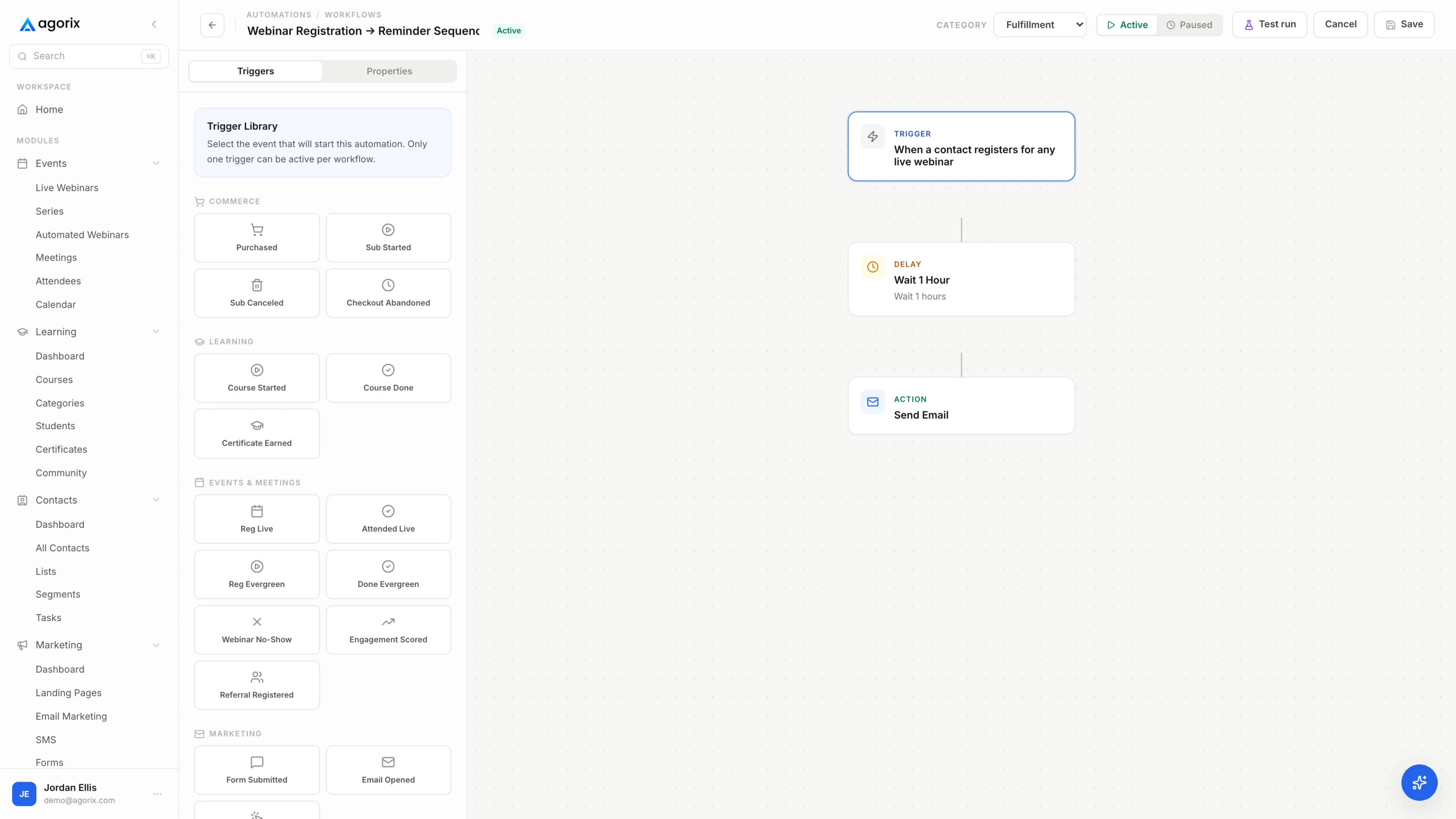
An automation builder branching a follow-up sequence on attendee behaviour.
Fig. 01The signals as branches. However you build it, the split has to happen without anybody sorting an export by hand at 9pm on the day of the session.
Where a tool decision changes the plan

Collecting signals is easy anywhere. Joining them to a person is not.

Polls, questions, watch time and offer clicks exist in every webinar tool. Turning them into “stayed through the offer, asked about implementation, has not purchased” usually means reconciling three exports. In Agorix those signals land on the same customer record as the registration and the checkout, so that sentence is an audience — see how live webinars work.

Start your 14-day trial 14 days · $0 due today · Payment method required · Cancel before first charge and pay nothing
CrewSolo or moderated

Solo you can run four of these. With a moderator you can run all of them.

The constraint is not effort, it is attention: almost nobody can read a scrolling chat and teach at the same time. Everything below follows from that one fact, and pretending otherwise is how hosts end up reading chat during their own transition.

Running solo

Batch the reading

Read chat only at the checkpoints you planned, and say so out loud: “I am not looking at chat while I teach this bit — I will read all of it at the break.” Favour polls, which you can read in two seconds, and keep the single open-text prompt for a moment where you are deliberately pausing.

With a moderator

Somebody else holds the room

Open text becomes viable, logistics questions get answered while you teach, and the questions arrive triaged instead of raw. The moderator is also the only person who can tell you the audio dropped without you finding out from a chat message four minutes later.

What the moderator actually does

  • Welcomes people by name as they arrive. Ninety seconds of work that makes the room feel attended to before you have said anything.
  • Posts the three planned messages. Housekeeping at the open, the resource in the middle, the offer link at the transition. Written before the session, not composed live.
  • Answers the logistics questions. Replay, link, timezone, invoice. These are most of chat, and none of them should ever reach you mid-sentence.
  • Triages questions into the queue. De-duplicates, drops the ones already answered, flags the three worth taking first. This is the job that changes the last ten minutes most.
  • Watches the clock. A private message at ten minutes and two minutes before the transition. Sessions run long in the middle and pay for it at the offer.
  • Captures everything before the room closes. Chat log, poll results, the question queue, who asked what. Once the room closes, some of it is gone for good.
The brief you give them

Five lines, sent the day before.

The run sheet with timings, the three messages to post word for word, the answer to the replay question, the rule for what reaches you mid-session (audio or video failure only), and the one thing you want captured above all else — which is usually the obstacle answers. A moderator without a brief becomes a second audience member with a job title.

The engagement run sheet0 / 14 ready

Before you go live

In the room

If it stallsA silent room

Nobody is answering. Diagnose before you ask again.

The instinct is to repeat the question with more energy, which is the one response that reliably makes it worse. Three causes cover almost every silent room, and they have different fixes.

  1. Can it be answered in four seconds, on a phone? Most silence is a badly built question rather than a cold room. Three options where one is obviously the right answer, an open question that needs a paragraph, or a prompt that requires finding a widget nobody has used before — all of them produce the same nothing. Say where to click, ask for a number rather than a sentence, and delete the option nobody would admit to choosing.
  2. Has anybody gone first? Nobody wants to be the first person typing into a silent room. Seed it: the moderator answers, or you read the two answers that did arrive as though you expected three, or you answer it yourself and then ask. The second answer arrives much faster than the first, and by the fourth you can stop helping.
  3. Is it a small room rather than a quiet one? Twelve people who never type may be listening more closely than a hundred who do. In a room that size, switch from broadcast prompts to direct ones — “[Name], you registered saying [the thing]; is that still where you are?” It is the one engagement technique that works better the smaller the room gets, and it becomes unusable somewhere around thirty people.

Once you know which it is, act. The list below is ordered by how likely it is to change anything, not by how much it feels like doing something.

Worth doing

  • Seed the first answer yourself, or have a moderator do it
  • Ask for a number or one word instead of a sentence
  • Use names when the room is small enough for that to feel friendly rather than pointed
  • Read every answer that does arrive out loud, including the one-word ones
  • Move the prompt earlier next time — the first five minutes decide what the rest of the hour does

Not worth doing

  • Asking the same question again, with more enthusiasm
  • Adding points, badges or a spinning wheel that nobody asked for
  • Refusing to continue until the chat “wakes up”
  • Reading silence as proof the topic is wrong — half the room is at a desk with the volume low
  • Running any poll whose answer will not change a single thing you say or send
Before you conclude anything

A quiet room is not the same as a dead one.

Typing is one signal and it is the loudest, which makes it easy to mistake for the only one. People who never touched the chat still arrived on time, stayed through the transition, clicked the link, and watched the replay twice — all of which you can see, and none of which requires them to perform enthusiasm for you. Run the prompts, keep the signals you do get, and do not spend the teaching time trying to make a working room look busier.

Common questions

Six questions about engagement.

What are the best webinar engagement ideas?

Four earn their place in almost every session: a poll in the first five minutes that segments the room, one open-text prompt asking what is actually in the way, a question queue kept separate from scrolling chat, and the moment you post the offer link and read it out loud. Each produces a signal you can act on afterwards. Anything that produces only a nice moment in the room is decoration — and decoration costs a minute of the hour you spent two weeks getting people to show up for.

When should I run a poll during a webinar?

Run the first inside the first five minutes, before the teaching starts, so participating becomes normal while the stakes are low. Run a second around the midpoint, written so the answer changes what you emphasise next — and then visibly change it, because that is the payoff that keeps people answering. Run nothing between the last teaching block and the end of the transition.

Should I use chat or a Q&A queue for webinar questions?

Both, for different jobs. Chat is a conversation and it scrolls, which is fine for reactions, one-word answers and the room talking to itself. Questions need a queue: something you can sort, mark as answered, pre-load before the session and still read after the room closes. If your tool has no separate questions feature, run the queue by hand in a document with a moderator — and tell the room where questions are supposed to go.

How do I get people to participate in a webinar?

Make it cheap, make it early, and prove it matters. Ask for a number or one word rather than a sentence. Ask for the first time inside five minutes, while nobody has settled into watching passively. Read the answers out loud, including the short ones, and change what you cover based on them where you can. If nobody goes first, seed it yourself: the second answer always arrives faster than the first.

Do I need a moderator for a webinar?

You can run a good session solo with four planned interactions, because the real constraint is that almost nobody can read chat and teach at the same time. A moderator is what makes open-text prompts, a busy room and immediate logistics answers viable — welcoming people by name, posting the link, triaging questions into the queue, answering the replay question, and watching the clock so you do not have to. The script template marks the points where a solo host has to stop and look.

What do I do with poll answers after the webinar?

Treat them as two things: segments and language. They split the follow-up — early stage gets the smallest next step, advanced gets the edge case, and anyone who typed an obstacle gets that obstacle answered in their own words. The email templates are where those splits get written. If the answers cannot reach the system that sends the emails, either fix that or ask fewer questions.

Keep going

What happens either side of the room.

From interactions to a follow-up that writes itself

You collected the signals. Agorix is where they land.

Registration, the live room with chat, polls and questions, the offer and the checkout — all on one customer record, so “asked about implementation and has not bought” is a segment you can email rather than a query you never get around to running.

14 days · $0 due today · Payment method required · Cancel before first charge and pay nothing