Skip to content
Agorix
Competitor details last verified 28 July 2026

Agorix vs EverWebinar (2026): the evergreen room, or the evergreen funnel.

EverWebinar does one job and documents it carefully: a recorded session, delivered on a schedule that feels live. What it does not do — take the payment, hold the customer record, run the live event — is documented just as plainly.

12min read
17sources linked
0EverWebinar logos or screenshots

The short answer

Choose Agorix if

Your evergreen session is the front of a funnel — you want watch-time behaviour, the follow-up, the checkout and the course delivery on one record, and you want to run the live version of the same presentation in the same place.

Choose EverWebinar if

You want an automated session and nothing else, you already own a CRM, a cart and a course platform you like, and you want the cheapest way to put a proven recording on a schedule — especially if you already pay for WebinarJam, whose footnote lists EverWebinar as included from Basic upward.

The handoff

One evergreen funnel, six jobs. Follow which of them share a customer record.

EverWebinar
RegistrationEverWebinar pageEvergreen sessionEverWebinarLive eventWebinarJamCustomer recordAutoresponderCheckoutThird-party cartCourseAnother platform

Two of six jobs run inside EverWebinar. It sends its own reminders and can segment them by attendance — but the record those segments live beside is somewhere else, and so is the checkout.

Agorix
RegistrationNative pageEvergreen sessionNativeLive eventSame libraryCustomer recordOne timelineCheckoutNative commerceCourseNative delivery

Six of six on one record. Watch time, exit points and offer clicks sit beside purchase history and course progress, so a segment is one query rather than one export.

01The verdict

EverWebinar automates the session. Agorix automates the funnel the session sits in.

EverWebinar is an evergreen specialist and a thoughtful one. The scheduling model is deeper than ours on its own terms — Just-in-Time sessions every 15, 30 or 60 minutes, night-time hours hidden, late joiners fast-forwarded to the current moment, block-out dates, per-visitor time zones — and it ships simulated-live tooling that Agorix does not have at all.

The scope is where the two part company, and the vendor’s own documentation draws the lines. EverWebinar sessions are not presented in real time and have no live presenter; live events are WebinarJam, a separate product. It does not process payments. The CRM is an autoresponder you connect. Agorix runs the evergreen session, the live event, the record, the checkout and the course on one subscription — which is what turns watch time into a segment you can actually sell to.

See it yourself — 14-day trial 14 days · $0 due today · Cancel before first charge
02At a glance13 jobs

Thirteen jobs, two answers each.

Every EverWebinar cell is sourced to a Genesis Digital-owned page and dated. Where we could not verify something it is left out rather than estimated — and two rows go to them outright.

The jobAgorixEverWebinar
Evergreen / automated webinarsNativeScheduled, just-in-time and on-demand sessions where currently supported, with each viewer attached to the same customer record. Limited on Launch, full from Growth.NativeThe entire product, and a deep one. Specific date and time, recurring daily or weekly, Just-in-Time sessions every 15, 30 or 60 minutes, instant-watch replay, block-out dates and per-viewer time zones.
Live webinarsNativeThe same presentation runs live and then evergreen in one system, on one record and one subscription.Not offeredStated by the vendor: EverWebinar sessions “are not presented in real time” and “There is no live presenter during the broadcast.” Live events are WebinarJam, a separate product.
Session scheduling depthNativeScheduled, just-in-time and on-demand patterns where currently available. Confirm the exact options during implementation.NativeMore granular than ours on this one job: hide night-time schedules, allow late attendance so the session skips ahead to the current time, block dates, and block short-term registrations up to six days in advance.
Simulated engagementNot offeredAgorix does not ship simulated attendee counts, scripted chat or synthetic purchase notifications. If those are part of your conversion model, this is a capability we do not have.NativeDocumented as “simulated engagement tools”: live sale announcements, simulated chat messages, attendee count displays and redirect events. Chat is preloaded from a timestamped CSV of up to 5,000 lines.
Live moderation during a sessionNativeNative meetings and live sessions where a human presents and answers in real time, on the same record as the evergreen viewer history.NativeHybrid mode: the recording plays while a moderator answers chat live from the control panel. By default attendees see only their own messages and the moderator’s.
Source video hostingNativeRecordings and replays are hosted in the platform alongside the session, the registration page and the viewer record.Via integrationBroadcast sources are an external video file — YouTube, Vimeo or a direct MP4 link — or an imported WebinarJam session, which requires an active WebinarJam subscription in the same account.
Meetings & 1:1 schedulingNativeNative meetings on every paid plan; webinar-to-call routing from Growth.Not offeredNo meeting or appointment-scheduling product appears in EverWebinar’s documented feature set.
Courses & student portalNativeCourse building, student portal, certificates and progress on every paid plan, attached to the purchase that paid for them.Not offeredNo course, membership or student-portal capability appears in EverWebinar’s documented feature set.
Email, CRM & the customer recordNativeOne shared record carrying registration, watch time, offer clicks, purchases and course progress. 5,000–200,000 marketing contacts by plan.Via integrationReal native follow-up — up to 10 pre-webinar and 10 post-webinar notifications, segmented by whether someone attended, purchased, or left before a configured point. The CRM itself is an external connection.
Checkout, order bumps & upsellsNativeCheckout, subscriptions and order bumps on every plan; one-click upsells from Growth. The purchase lands on the same record as the watch time.Not offeredStated by the vendor: “WebinarJam and EverWebinar do not process payments.” Paid registration redirects to a third-party checkout, and the post-payment page “cannot be customized”.
Analytics & attributionNativeViewer-level behaviour on the customer record, and source → registration → watch time → offer click → checkout in one attribution model from Growth.Via integrationGenuinely good webinar reporting: show-up rate, average watch time, percentage who watched the full session, a 5-minute activity graph, revenue and earnings per attendee. Conversion rates exclude registrants who never entered the room.
Team seats2–25Two seats on Launch, five on Growth, ten on Pro, twenty-five on Business, custom on Agency / Enterprise.1The published inclusions list one team member account, and the three billing terms carry the same features as each other.
Entry price$149 / moLaunch, billed monthly. $119/mo equivalent billed annually. Includes the entire platform — the tier sets capacity, not access.$199 / moBilled monthly. $99/mo effective billed as $1,188 once a year, or $79/mo effective billed as $1,896 every two years. Each card is marked new customers only.
NativeRuns inside the platformVia integrationNeeds a second productNot offeredNot part of the platform
03Who each is for

These are not the same purchase.

Agorix

Businesses where the evergreen session starts a relationship

Coaches, consultants, course creators and agencies running a proven presentation as an always-on acquisition channel, then selling a program behind it. You want to know that someone watched 34 minutes, left before the offer and came back to the pricing page the next day — and you want that to reach the follow-up, the segment and the attribution model without an export. You also expect to run the live version of the same presentation, and you would rather not hold the same customer twice in two products.

EverWebinar

Businesses that need one automated session, configured well

Presenters with a recording that already converts and infrastructure they are happy with — an autoresponder they know, a cart that works, a course platform their students already use. Your constraint is putting the session on a schedule that fills, with the room energy your offer relies on, at the lowest price. Exporting registrants into the CRM afterwards is a cost you have already accepted, and if you run WebinarJam for live events the evergreen half arrives without a second invoice.

04Deep dive6 jobs

Six jobs, and what the difference costs you.

Each section reads the same way: what EverWebinar does, what Agorix does, and what the gap between them means on an operating Monday. The first two do not go our way.

The scheduling model

EverWebinar

This is the part EverWebinar has thought hardest about, and it shows. Sessions run at a specific date and time, on a recurring daily or weekly schedule, or as Just-in-Time sessions that appear to start soon after a visitor arrives — offered at every 15 minutes, every 30 minutes or every hour. Around that sit real operational controls: hide night-time schedules so the timetable looks intentional, allow late attendance so the session skips ahead to match the current time, block out holidays, block short-term registrations up to six days in advance, and display times either in a fixed time zone or the visitor’s own.

Agorix

Agorix offers scheduled, just-in-time and on-demand experiences where currently supported, and keeps each viewer attached to the same record throughout — where they came from, when they joined, how far they watched, whether they reached the offer, and what they did the next day. The scheduling controls are not documented at EverWebinar’s level of granularity, and we would rather say so than imply parity.

What it means

On the narrow question of how many ways a recorded session can be put on a timetable, EverWebinar is ahead. The rest of this page is about what happens to the viewer afterwards.

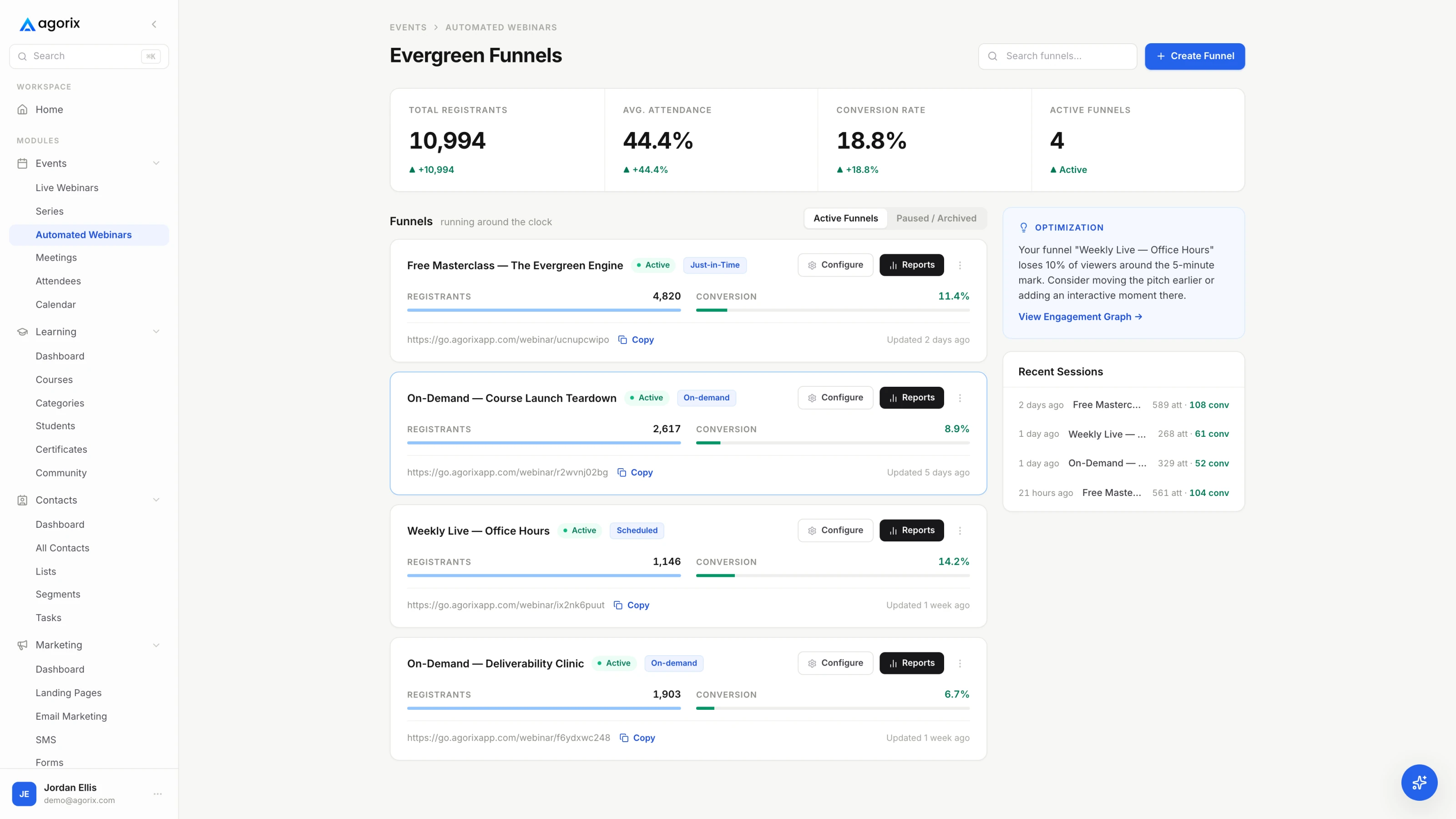
The Agorix evergreen webinar console showing session schedules and viewer watch-time behaviour.
AgorixEvergreen sessions, the registration page and the viewer record are one object in Agorix.

What the session simulates

EverWebinar

EverWebinar documents a set of features it calls simulated engagement tools: live sale announcements showing recent purchases, simulated chat messages appearing during the session, attendee count displays, and redirect events. Chat is preloaded from a timestamped CSV — up to 5,000 lines and 1 MB — with a role and mode per line, and an option to capture and approve real comments alongside it. A moderator can answer chat live while the recording plays, which the vendor calls hybrid mode. EverWebinar addresses the obvious question on its own page: it argues that “fake live” implies deception, while simulated live is “about structure: scheduled starts, timed beats, and session-based deadlines — without claiming you’re presenting in real time.”

Agorix

Agorix does not ship simulated attendee counts, scripted chat or synthetic purchase notifications, and we are not going to pretend that is a feature comparison we win — it is a capability we do not have. What Agorix does instead is make the real signal usable: actual watch time, actual exit points, actual offer clicks, on the record the follow-up and the checkout read from.

What it means

These are two different bets on what makes an evergreen session convert — manufactured room energy, or a follow-up that knows exactly what each viewer did. Decide which one you would be comfortable explaining to a buyer.

Live, and why it is a second subscription

EverWebinar

The vendor is unambiguous. EverWebinar sessions “are not presented in real time; they are recorded in advance and delivered automatically at scheduled times”, and “There is no live presenter during the broadcast” — a moderator can review chat and answer questions, but nobody is on camera. Live events are WebinarJam, a separate product from the same company. Even the import path assumes both: pulling a WebinarJam session in as your broadcast source requires an active WebinarJam subscription in the same account.

Agorix

Agorix runs the live event and the evergreen session in one system. Prove the presentation live, then promote the strongest run to evergreen without moving platforms — and a contact’s history reads as one story rather than two products each holding half a customer.

What it means

Every evergreen program eventually wants a live launch, and every live webinar eventually deserves an evergreen life. Two products means two records of the same person.

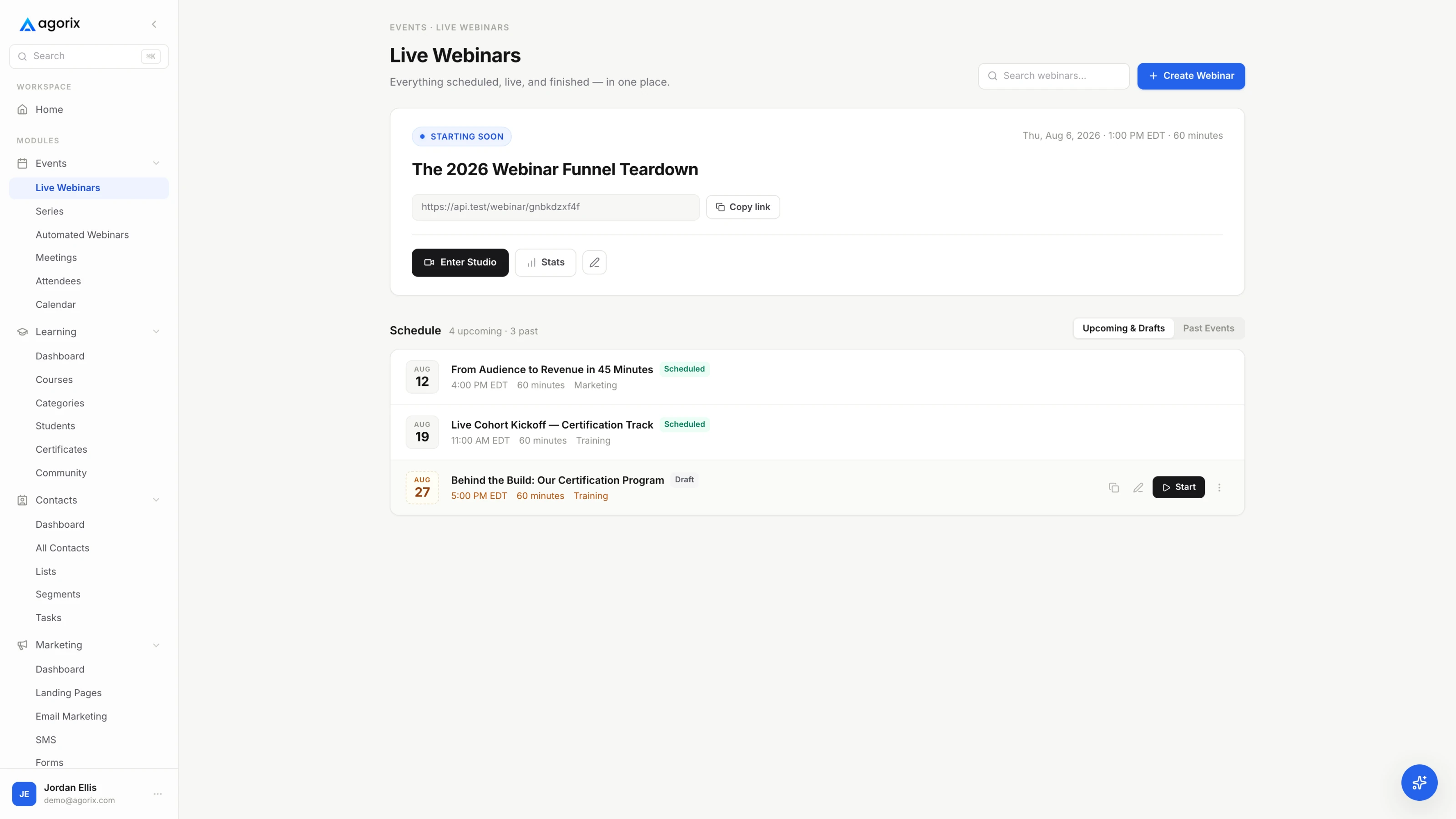
The Agorix live webinar console showing scheduled sessions, registration counts and room status.
AgorixThe live room and the evergreen library share one system, one record and one subscription.

Follow-up: what it can branch on, and where it stops

EverWebinar

This is better than most room-only products, and worth crediting properly. EverWebinar sends up to ten pre-webinar and ten post-webinar notifications itself, and the documented segments go beyond attended-or-not: whether someone attended, whether they purchased, and whether they left before or stayed until a configured point in the session. Automation rules fire triggers into a connected autoresponder, with negative triggers — missed the webinar, left early — evaluated once the session concludes. Two limits are documented: replay attendees support only three triggers (registered, attended the replay, purchased), and SMS is one message 15 minutes before, using your own Twilio account.

Agorix

Agorix branches on the same behaviour and then keeps going, because the segment is not confined to the webinar tool. “Left before the offer, bought something else last quarter, opened the pricing page on Thursday” is one query on one record, and it can drive an email, a workflow, a task or an Operator-prepared follow-up. Agorix does not send SMS at all today — that is a real gap next to a Twilio-connected reminder.

What it means

The question is not whether the webinar tool can segment. It is whether that segment can be combined with everything else you know about the person without an export.

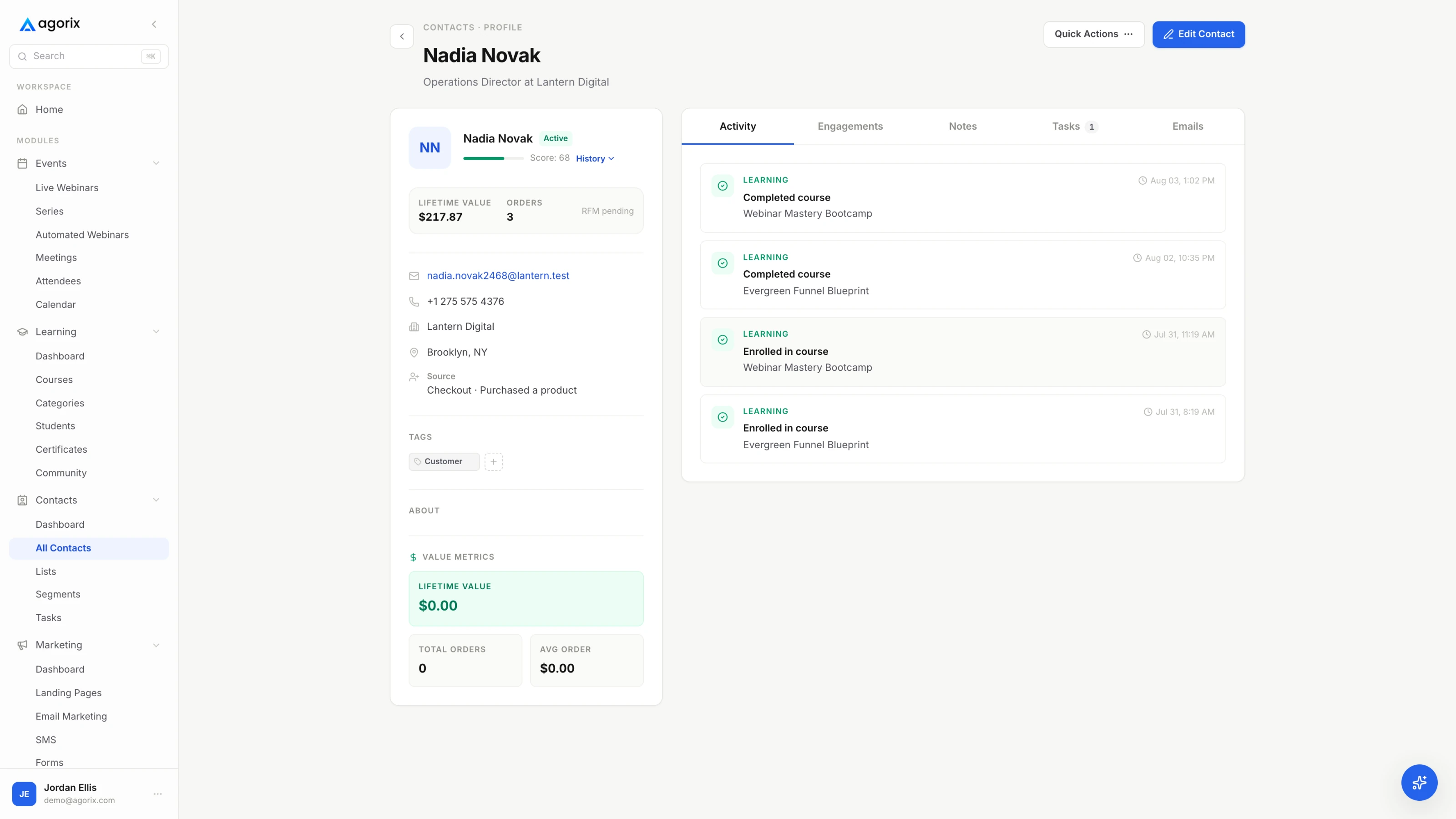
An Agorix contact record showing registration, watch time, offer clicks and purchase history on one timeline.
AgorixOne record: the registration, the minutes watched, the offer click and the purchase.

Where the money is taken

EverWebinar

The support documentation states it plainly: WebinarJam and EverWebinar do not process payments. Charging for registration means sending people to a third-party checkout such as PayPal or Stripe and returning them to finish signing up, and the post-payment page the platform generates cannot be customized. The same article documents the failure mode this produces — a payment can arrive without a matching registrant if the buyer does not complete the final step.

Agorix

Checkout, subscriptions and order bumps are on every paid plan; one-click upsells arrive at Growth. The offer shown at minute 38, the receipt that follows it and the course access it unlocks are configured in the same place and land on the same record, where currently supported.

What it means

An evergreen funnel is a sales machine. A sales machine that cannot take the money cannot tell you which minute of the presentation earned it.

Analytics, and the funnel you can actually see

EverWebinar

The reporting is legitimately strong for a single-purpose product. Traffic covers registration-page visitors, sign-up rate, registrants, live and replay attendees, and show-up rate. Engagement covers total attendees, average watch time, the percentage who watched the whole session, viewer ratings and an attendee activity graph at five-minute intervals. Monetization covers purchases, revenue, conversion rate and earnings per attendee. One documented caveat matters: conversion rates count only attendees who entered the room, so registrants who never showed are excluded from the denominator.

Agorix

The same viewer behaviour lands on the customer record rather than in a webinar dashboard, so it composes with prior purchases, course progress and every other journey the person has been through. Source, registration, watch time, offer click and purchase share one attribution model, full from Growth upward, and the AI Operator can review the journey and prepare a change for a human to approve.

What it means

A webinar report tells you the funnel average. A customer record tells you which person to call, and why, before the interest cools.

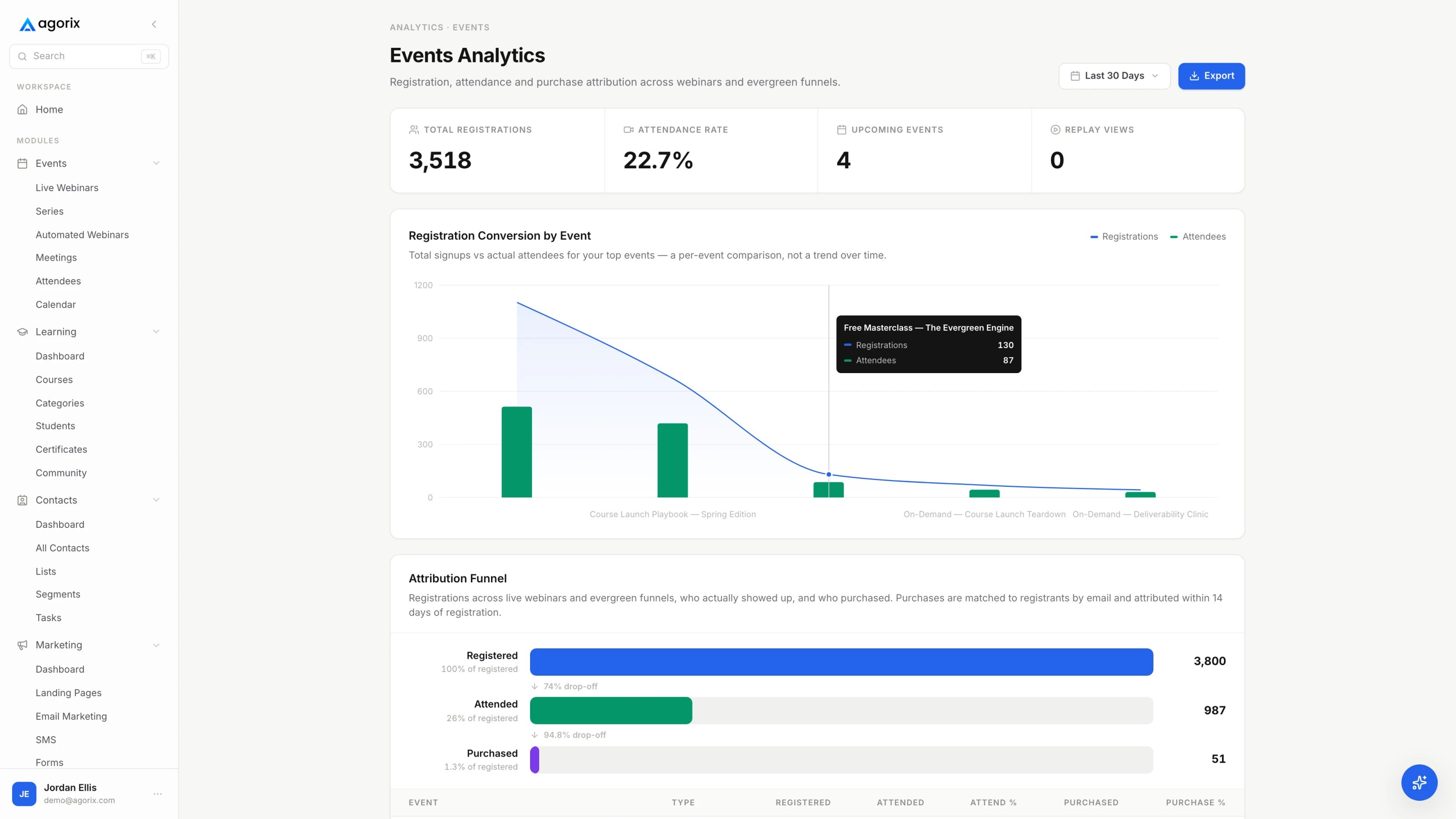
An Agorix events analytics view showing registration, attendance, watch time and revenue for a session.
AgorixWatch-time behaviour and the revenue it produced, read from the same record.
The deadline question

Every evergreen comparison eventually reaches the same argument, so here is our published position rather than a characterisation of anyone else’s. Deadlines move evergreen buyers exactly as well as live ones — when they are real. A genuine enrollment window, a bonus that actually expires, a price that actually changes: all fine. A countdown that resets for whoever reloads the page is a conversion tactic that costs you the customer’s trust at the exact moment you won it. Build the urgency you are willing to enforce. The longer version, with the five stages of the funnel and the maintenance review that keeps it converting, is in our evergreen webinar funnel playbook.

05Pricing

The cheaper product depends on the billing term.

Month to month, Agorix Launch undercuts EverWebinar. Billed annually, EverWebinar undercuts Agorix Launch. EverWebinar figures verified 28 July 2026; Agorix figures from our pricing page.

AgorixAnnual saves 20%
Launch — 100 live attendees · 5,000 contacts$149 / $119
Growth — 250 live attendees · 25,000 contacts$399 / $319
Pro — 500 live attendees · 75,000 contacts$799 / $639
Business — 1,000 live attendees · 200,000 contacts$1,499 / $1,199
Every paid plan includes the whole platform — live and evergreen webinars, meetings, courses, marketing, CRM, commerce, workflows and the AI Operator. Evergreen capability is limited on Launch and expands from Growth upward. Launch, Growth and Pro are self-serve; Business and above are sales-led.
EverWebinarVerified 28 July 2026
Monthly — billed each month$199 / mo
Annual — billed $1,188 once a year$99 / mo
2-year — billed $1,896 every two years$79 / mo
Attendee capacity — not publishedNot published
The three options carry identical features and differ only in billing; the published inclusions list one team member account. The $99 and $79 figures are effective monthly rates — the full $1,188 or $1,896 is charged up front. Every card is marked new customers only. A $1 trial runs 14 days, is nonrefundable, and converts to the paid subscription automatically unless cancelled first; a 30-day money-back guarantee is advertised alongside it. Separately, WebinarJam’s pricing footnote lists EverWebinar as included at no additional cost on Basic, Professional and Enterprise.
The capacity question

The two products meter different things. EverWebinar sells one configuration on three billing terms and publishes no attendee capacity at all, so we do not quote one. Agorix meters the business — live attendees and marketing contacts, email volume, seats, workspaces and AI Credits. The attendee limit is the one that usually forces a plan change on webinar platforms, so it has an escape valve: a one-time boost for a single event instead of a permanent upgrade for one busy night.

+250 attendees, one event$49
+500 attendees, one event$99
+1,000 attendees, one event$249
+2,500 attendees, one event$499

Price the funnel, not the player.

Add up what you pay today for the autoresponder, the cart, the course platform and the live webinar tool alongside the evergreen one. That total is the number this comparison is actually about.

14 days · $0 due today · Payment method required · Cancel before first charge and pay nothing
06Switching path

Do not move the library. Move one session.

Registration pages, notification sequences and session configuration are rebuilt rather than migrated — no platform exports those into another. Registrant and attendee data does move.

1First

Rebuild the one session that earns

Pick the evergreen webinar producing the most revenue and rebuild only that: registration page, reminder sequence, session, timed offer. Everything else keeps running where it is while you compare the two side by side.

2Then

Bring the viewers, not just the emails

Export registrant and attendee data and map it onto the Agorix customer record, so past viewing history sits under the same contact as the new behaviour. Decide which contacts are active marketing contacts and which are history you keep without paying to market to.

3Then

Put the checkout on the same record

This is the step that changes the numbers. Rebuild the offer as an Agorix checkout so the purchase attaches to the watch-time behaviour that produced it, instead of arriving from a separate cart with no minute attached.

4Last

Decide what the live version is for

Evergreen earns its place by being a proven presentation. Run the next live session in Agorix too, so the laboratory and the distribution arm share one record — and re-promote the strongest run rather than the first one.

Self-serveLaunch includes self-serve onboarding, and evergreen capability expands from Growth upward.
$499 setup packageOptional on Growth, for teams that want the first connected journey configured with them.
$1,500 funnel migrationOptional on Pro, for multi-offer accounts moving several funnels at once.
Check your renewal date firstEverWebinar’s annual and two-year terms are charged up front, so time the move rather than paying twice. Book a migration walkthrough.
07Where EverWebinar is the better fit

Six reasons to stay where you are.

Written by us, about a competitor, on our own site. If one of these is load-bearing for your business, take it seriously — switching would cost you something real.

Cheaper, and much cheaper if you already run WebinarJam

Standalone EverWebinar is $99/mo effective billed as $1,188 once a year, or $79/mo effective billed as $1,896 every two years. And WebinarJam’s own footnote lists EverWebinar as included at no additional cost on Basic, Professional and Enterprise — so a WebinarJam Basic subscriber is getting evergreen without a second invoice. Agorix Launch is $119/mo billed annually and buys a different thing entirely, but on price alone this is not close. [1]

More scheduling control on the one job it does

Just-in-Time sessions every 15, 30 or 60 minutes, hiding night-time schedules so the timetable reads as intentional, late attendance that fast-forwards to the current moment, block-out dates for holidays, blocking short-term registrations up to six days ahead, and a choice between a fixed time zone and each visitor’s own. Agorix does not document evergreen scheduling at this granularity. [5]

Simulated-live tooling Agorix simply does not have

Live sale announcements, attendee count displays, and chat preloaded from a timestamped CSV of up to 5,000 lines — with hybrid mode letting a real person answer questions while the recording plays. If manufactured room energy is part of how your offer converts, Agorix has no equivalent to any of this. [6]

Replica Replay import from a live session

A WebinarJam session can be imported as the broadcast source with its chat, polls, offers and timing reproduced as they occurred, and a WebinarJam chat export is already formatted for EverWebinar’s CSV importer. For teams running live first and automating second, that is a genuinely short path. [14]

One product, one job, no plan matrix

There are no feature tiers to decode — the monthly, annual and two-year options carry identical features and differ only in billing. The vendor’s own estimate is that a straightforward webinar can often be configured in one to two hours when the recording and copy are ready. Deliberately small scope is a real advantage when you already own the rest of the stack. [1]

A decade in market, and a cheap way to test it

Genesis Digital’s company history dates EverWebinar to August 2015. A $1 trial runs 14 days — worth reading the terms, since the $1 is nonrefundable and the trial converts to the paid subscription automatically unless you cancel before it ends. [17]

08Switcher questions

The six people actually ask.

Evaluating the live side instead? Agorix vs WebinarJam covers the sibling product. Or compare Agorix plans and book a walkthrough with your current stack.

Does EverWebinar run live webinars?

No. The vendor’s own getting-started documentation states that EverWebinar sessions “are not presented in real time” and that “There is no live presenter during the broadcast” — a moderator can answer chat while the recording plays, but nobody is on camera. Live events are WebinarJam, a separate product from the same company, which we cover in Agorix vs WebinarJam. Agorix runs both in one system on one record.

Is a simulated-live session dishonest?

That is a question about how you configure a tool, not about the tool itself, and EverWebinar answers it directly on its own site: it argues that “fake live” implies deception, while simulated live is “about structure: scheduled starts, timed beats, and session-based deadlines — without claiming you’re presenting in real time.”

Our published position is narrower and about one thing only, the deadline. From our evergreen webinar funnel playbook: deadlines move evergreen buyers exactly as well as live ones — when they are real. A genuine enrollment window, a bonus that actually expires, a price that actually changes are all fine. A countdown that resets for whoever reloads the page costs you the customer’s trust at the exact moment you won it. Build the urgency you are willing to enforce.

Can EverWebinar take the payment for a paid registration?

No. The support documentation states that WebinarJam and EverWebinar do not process payments. Charging means redirecting to a third-party checkout such as PayPal or Stripe and returning the buyer to finish registering, and the post-payment page the platform generates cannot be customized. On Agorix the checkout is part of the platform, so the purchase lands on the same record as the watch time that produced it.

Can I follow up based on how far someone watched?

On both, and EverWebinar does this better than most single-purpose products — its notifications can be targeted at people who attended, who purchased, or who left before or stayed until a configured point, with up to ten emails before and ten after. Two documented limits: replay attendees support only three triggers, and everything downstream runs through a connected autoresponder. On Agorix the same behaviour lands on the shared record, so it combines with purchase history, course progress and every other journey without an export.

Is Agorix more expensive than EverWebinar?

It depends on the billing term, and the answer is not the one you would expect. Month to month, Agorix Launch is $149 against EverWebinar’s $199 — Agorix is cheaper. Billed annually, EverWebinar is $99/mo effective against Agorix Launch at $119/mo — EverWebinar is cheaper. Neither number settles it, because the fair line is Agorix against EverWebinar plus whatever you pay for the CRM, the cart, the course platform, and WebinarJam if you also run live.

Is the AI Operator included in the free trial?

No. The current self-serve trial does not enable the AI Operator. Paid plans include monthly AI Credits, and a walkthrough can show how the Operator reviews an evergreen journey and prepares a change for approval before you pick a plan.

One connected record

Run the evergreen funnel — session, follow-up, checkout, course — on one record.

Start with the recording you already have. Build the registration page, put the session on a schedule, and look at what the follow-up knows about each viewer the next morning.

14 days · $0 due today · Payment method required · Cancel before first charge and pay nothing

Sources

Competitor details last verified 28 July 2026
  1. [1]EverWebinar — Pricing: monthly, annual and two-year billing terms, what every plan includes, 30-day guarantee, FAQ
  2. [2]EverWebinar — 14-day trial: $1 trial terms, automatic conversion, the exact amount charged when the trial ends
  3. [3]EverWebinar — Simulated live: hybrid mode, scheduled chat, and the vendor’s own published position on “fake live”
  4. [4]Support — Getting started with EverWebinar: sessions “are not presented in real time”, no live presenter, moderator role
  5. [5]Support — Schedule your webinar: schedule types, Just-in-Time intervals, night-time hiding, late attendance, block dates, time zones
  6. [6]Support — Injections: EverWebinar’s scheduled polls, files, announcements and offers, and its documented simulated engagement tools
  7. [7]Support — Import chat messages: the preloaded chat CSV format, the 5,000-line limit, and the option to save real comments
  8. [8]Support — Moderate using the control panel: answering chat in real time, chat visibility defaults, no video feed on Just-in-Time
  9. [9]Support — Webinar analytics: traffic, engagement and monetization metrics, the 5-minute activity graph, attendance segments
  10. [10]Support — Notifications and reminders: up to 10 pre-webinar and 10 post-webinar emails; one Twilio SMS 15 minutes before
  11. [11]Support — Automation rules: triggers and actions, negative triggers evaluated after the session, replay trigger limits
  12. [12]Support — Paid registration: “WebinarJam and EverWebinar do not process payments”; the third-party checkout flow
  13. [13]Support — Connect an autoresponder or CRM: managing registrants and follow-up “outside the platform”, custom webhooks
  14. [14]Support — Broadcast source: external video files, or importing a WebinarJam session, which requires an active WebinarJam subscription
  15. [15]Support — One-click registration: requires an API key, a paid account and a supported autoresponder; unsupported for Just-in-Time and Instant Replay
  16. [16]WebinarJam — Pricing: the plan ladder, and the footnote listing EverWebinar as included on Basic, Professional and Enterprise
  17. [17]Genesis Digital — Company story: EverWebinar introduced in August 2015

Agorix plan prices, capacities, trial terms and migration packages come from our own pricing page. Five things we could not verify from a vendor-owned page are therefore not stated anywhere above: how many attendees an EverWebinar session holds, which no vendor page publishes; a “$47/month” figure that appears only in the pricing page’s metadata and nowhere on the page itself; the marketing description of Just-in-Time sessions starting “5–15 minutes” after registration, which the documentation does not corroborate, so we cite the documented 15, 30 and 60-minute intervals instead; whether Kartra bundles EverWebinar, which WebinarJam’s integrations page asserts and no Kartra-owned page confirms; and EverWebinar’s published customer, webinar and lead counts, which carry no date or methodology. Competitor pricing and features change; this page is re-verified quarterly and the stamp above moves with it. No EverWebinar logos or interface screenshots appear on this page by design.