Skip to content
Agorix
Competitor details last verified 28 July 2026

Agorix vs Zoom Webinars (2026): the room is not the funnel.

Zoom runs the best-known room in the business, and on the room alone it is hard to beat. But a marketing webinar is a room plus a machine — and the machine is where these two products stop looking alike.

13min read
23sources linked
0Zoom logos or screenshots

The short answer

Choose Agorix if

The webinar is how you acquire customers, and you want the registration page, the behavioural follow-up, the checkout and the course sitting on the same record as the room — without a nightly reconciliation between four tools.

Choose Zoom if

The room is the product: enormous audiences, compliance your buyers already accepted, production depth for a broadcast that has to be perfect — and a funnel that already lives in tools you are happy with.

The handoff

One webinar, six jobs. Follow which of them share a customer record.

Zoom Webinars
RegistrationNative, basicRemindersFixed-slot templateLive roomNativeFollow-upMarketing platformCheckoutEcommerce toolCourseCourse platform

Three of six are native, and the room is the best one on the list. The other three live in tools that never see the room — so the follow-up starts from a CSV export, not from what people did while you were talking. Webinars Plus and Events pull the page builder, triggered emails and ticketing back in-house, at roughly 3.5× the license price and still scoped to the event rather than the customer.

Agorix
RegistrationNative pageRemindersNative emailLive roomNativeFollow-upBy behaviourCheckoutNative commerceCourseNative delivery

Six of six on one record. Watch time, questions and offer clicks are available to the follow-up before the room closes.

01The verdict

Zoom is the room, and a very good one. A webinar is a room plus a machine.

Zoom’s pricing page currently publishes three webinar SKUs — Zoom Webinars, Zoom Webinars Plus and Zoom Events — all of which sit on top of a required Zoom Workplace Pro license. Base Webinars gives you a branded registration page, fixed-slot reminder and follow-up emails, and the most reliable broadcast room most of your audience has ever used. Move up to Webinars Plus and a real marketing layer appears: a page builder, rule-triggered emails, ticketing, simulive and richer analytics.

So the useful claim is not that Zoom has no funnel. It is that Zoom’s machine is scoped to the event — one webinar, its registrants, its tickets, its attendance — while a business needs a machine scoped to the customer, carrying somebody from an ad click through three webinars, a purchase and a course. On Zoom that second machine is a stack you assemble and reconcile. On Agorix the room and the machine share one customer record.

Scope

This page compares Zoom’s webinar products against Agorix. It is not a comparison of Zoom Meetings, and Agorix is not trying to replace the tool your team uses for daily calls.

See it yourself — 14-day trial 14 days · $0 due today · Cancel before first charge
02At a glance15 jobs

Fifteen jobs, two answers each.

Every Zoom cell is sourced to a Zoom-owned page and dated. Where a cell differs between base Webinars and the higher SKUs, the note says so rather than picking the flattering one.

The jobAgorixZoom
The public live webinar roomNativeBrowser-based room with chat, questions, polls and a timed offer, writing arrival time and watch time to the customer record as the session runs.NativeThe reference product in this category: Q&A, chat, polls, reactions and surveys, sessions up to 30 hours, and attendees who join from a browser without a Zoom account.
Branded registration pageNativeLanding pages, registration pages and forms on every paid plan, built by you and attached to the same record as the room.NativeBase Webinars gives a Zoom-hosted registration page with your logo, banner and theme colors, custom questions, approval control and tracking pixels. A full page builder arrives on Webinars Plus.
Event reminder & follow-up emailsNativeSequences you shape, sent from your own domain, branching on what the attendee actually did.NativeBase Webinars sends fixed-slot templates — reminder 1 hour, 1 day or 1 week before; attendee and absentee follow-ups 1–7 days after. Webinars Plus adds a rule-triggered email builder.
Ongoing email marketing, CRM & nurtureNativeBroadcasts, sequences, CRM and the unified customer timeline on every paid plan. 5,000–200,000 marketing contacts by tier.Via integrationZoom’s email tooling is scoped to an event and its registrants. A lifecycle programme across offers means Salesforce, HubSpot, Marketo, Eloqua, Pardot, Ontraport or Zapier.
Evergreen: on-demand & simuliveNativeScheduled, just-in-time and on-demand sessions with viewer-level watch-time behaviour. Limited on Launch, full from Growth.NativeOn-demand runs on base Webinars but is documented as incompatible with attendee emails, post-attendee links and surveys. Simulive requires a Webinars Plus or Events Unlimited license.
Meetings & 1:1 schedulingNativeNative meetings on every paid plan; webinar-to-call routing from Growth.NativeZoom’s home ground, and the reason most teams already have an account. Nothing on this page suggests replacing it.
Courses & student portalNativeCourse building, student portal, certificates and progress on every paid plan, on the same timeline as the webinar that sold it.Via integrationZoom’s Webinars Plus materials reference learning certifications and video channels, but no course product with lessons, progress and a portal is published on Zoom’s webinar pages.
Paid registration & ticketingNativeCheckout on every paid plan, so a paid seat and a paid offer are the same commerce system on the same record.NativeBase Webinars can charge a registration fee through PayPal. Webinars Plus and Events add free and paid ticketing, requiring a Stripe or PayPal Business account.
Product checkout, order bumps & upsellsNativeCheckout, subscriptions and order bumps on every plan; one-click upsells from Growth. The purchase lands beside the watch time.Via integrationZoom sells the seat, not the offer. Checkout for the programme you pitch inside the webinar is not published on Zoom’s webinar product pages.
One customer record across eventsNativeRegistration, attendance, watch time, offer clicks, purchases and course progress on a single timeline that persists across every event.Via integrationZoom reports per webinar and exports CSV on base Webinars, with dashboards on Plus and Events. A record that persists across events and purchases lives in the CRM you connect.
Behavioural segmentation by watch time & offer clicksNativeSegment on attended, no-show, minutes watched, questions asked and offer clicked — natively, because the room and the email system share one record.Via integrationWebinars Plus filters email recipients by registration method, ticket type, payment status and session attendance. Segmenting your wider audience on what they watched happens in the connected platform.
Closed-loop attribution to revenueNativeSource → registration → attendance → offer click → checkout in one model. Full closed-loop attribution from Growth.Via integrationZoom measures the event accurately. Revenue lives in whichever checkout you use, so joining the two is a reconciliation job in a third system.
Workflows & AINativeVisual workflows plus an AI Operator that prepares funnels, emails, segments and course material behind human approval gates, metered in AI Credits.NativeWebinars Plus generates event text, images and video with Zoom’s AI features and repurposes content afterwards, alongside engagement scoring and cross-event analytics.
Attendee ceiling2,500+1,000 live attendees on Business; Agency / Enterprise starts at 2,500+. One-time room boosts add 250–2,500 for a single event without a permanent plan change.100,000Zoom’s pricing FAQ states its products support up to 100,000 attendees with the native engagement features intact. The Webinars ladder runs 300, 500, 1,000, 3,000, 5,000 and 10,000+.
Entry price$149 / moLaunch, billed monthly. $119/mo equivalent billed annually. Includes the entire platform — the tier sets capacity, not access.$66.67 / moZoom Webinars at 300 attendees, billed annually — plus the Zoom Workplace Pro license every webinar SKU requires, at $14.16 per user per month billed annually. Delivery only.
NativeRuns inside the platformVia integrationNeeds a second productNot offeredNot part of the platform
03Who each is for

These are not the same purchase.

Agorix

Businesses where the webinar is the acquisition engine

Coaches, consultants, course creators and agencies whose revenue starts with a live or evergreen session and continues into a high-ticket offer or a programme. You care that someone stayed 41 minutes, asked about implementation and clicked the offer without buying, because that is the list you want to work on Monday. You would rather operate one system with honest capacity limits than four with a reconciliation job between them, and you want an AI Operator that prepares the work and stops at an approval gate.

Zoom

Organisations where the broadcast is the deliverable

Companies running town halls, customer training, partner enablement, analyst briefings and multi-track conferences — where the job is to broadcast reliably to a large, sometimes enormous audience that already has Zoom installed. Also the marketing team whose funnel genuinely already works: the CRM, email platform, page builder and checkout are chosen, integrated and staffed, and the webinar tool’s only remaining job is to be the most reliable room on the market.

04Deep dive7 jobs

Seven jobs, and what the difference costs you.

Each section reads the same way: what Zoom does, what Agorix does, and what the gap between them means on an operating Monday. The first one goes against us.

The room itself

Zoom

This is Zoom’s home ground and the honest place to start. The webinar SKUs carry Q&A, chat, polls, reactions and surveys, run sessions up to 30 hours, and stream the same session to YouTube, LinkedIn and Facebook over RTMP. Zoom publishes support for up to 100,000 attendees with the engagement features intact. Attendees join from the desktop app, a phone, or the Zoom Web App in a browser — and Zoom states plainly that they do not need a Zoom account to get in.

Agorix

Agorix runs its own browser-based room with registration, chat, questions, polls and a timed offer. The reason it exists is not that it out-produces Zoom. It is that arrival time, watch time, questions asked and offer clicks land on the customer record while the session is still running, instead of arriving later as a report you download.

What it means

On the room alone, Zoom is the safer pick and we are not going to pretend otherwise. The argument only begins when you ask what the room is for.

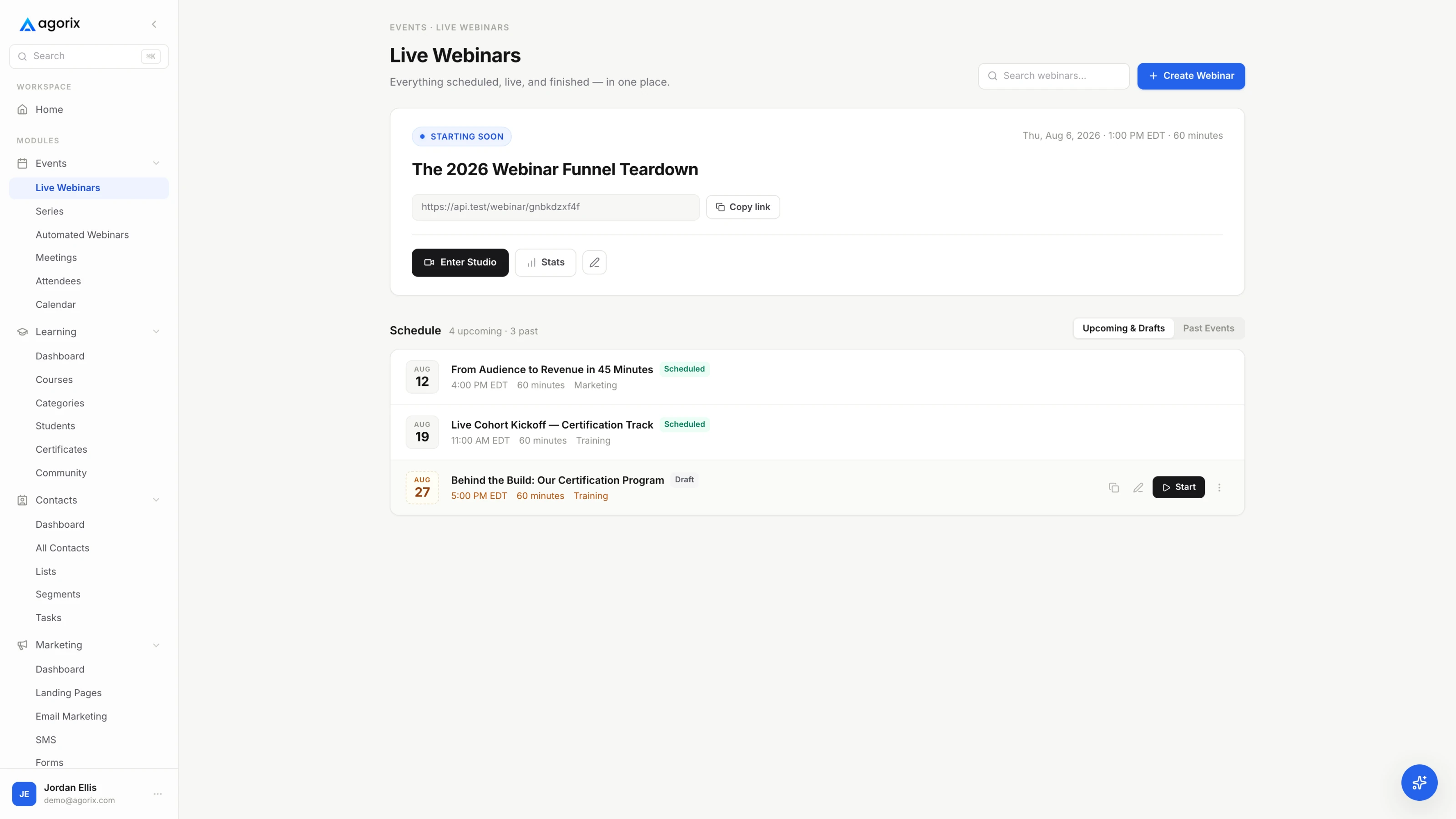
The Agorix live webinar console showing scheduled sessions, registration counts and room status.
AgorixThe live room, the registration page and the attendee record are one object in Agorix.

The page in front of the room, and the emails around it

Zoom

Zoom Webinars builds a registration page, and it is more configurable than critics admit: your logo, banner and theme colors, custom questions, automatic or manual approval, a cap on registrants, social share buttons, tracking pixels, and up to 20 speakers with bios and photos. The emails are where the ceiling shows. Base Webinars sends fixed-slot templates — a reminder one hour, one day or one week before, attendee and absentee follow-ups one to seven days after — and a host can change the subject line and add text, while full template editing is an admin job that Zoom’s own documentation says requires HTML, CSS and FreeMarker knowledge. On Pro accounts, confirmation and reminder emails send from Zoom and the From field cannot be modified. Webinars Plus is a different animal: it adds a page builder and an email builder that triggers on a date, an offset from the event, or a rule.

Agorix

Landing pages, registration pages, forms, broadcasts and sequences are on every paid plan, and they write to the same record as the room. The registration page is a page you build, the reminder is a sequence you shape, and the sending domain is yours.

What it means

On the base tier, email is a notification system rather than a marketing system: three fixed slots, subject-line control, and a From address you cannot change. The marketing version of it does exist — one SKU up.

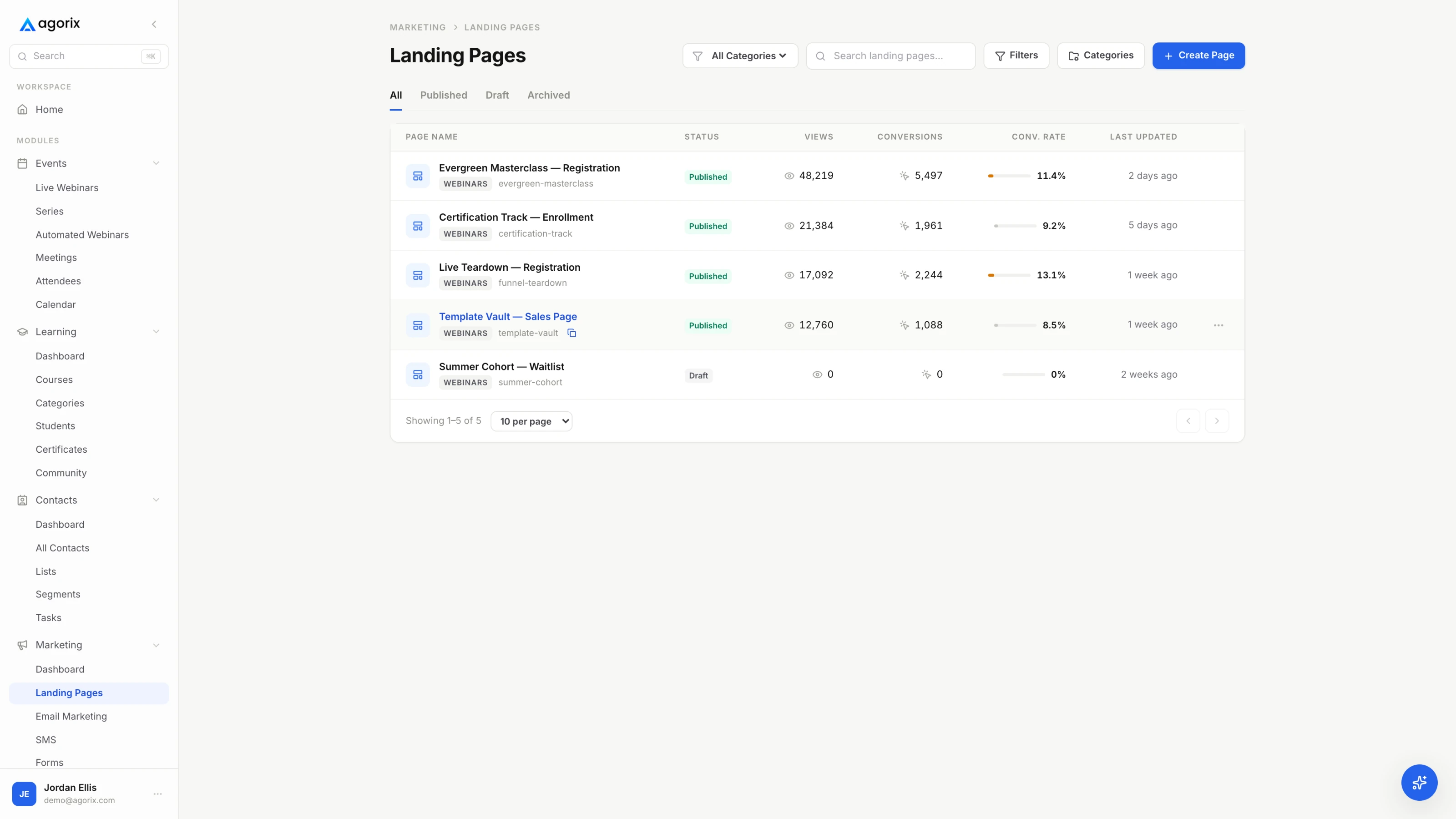
The Agorix landing page list showing each registration page with its status, views, conversions and conversion rate.
AgorixRegistration pages are built in the platform, so the form writes straight to the customer record.

Where the behaviour goes afterwards

Zoom

Zoom measures the room properly. The registration report lists registrants and their details; the attendee report shows when each person joined, when they left and their total time in session; the performance report covers registration, attendance and feedback; and Q&A, polls and surveys each get their own. On base Webinars you export them as CSV, and on Webinars Plus and Events you get dashboards and custom reports. Moving any of it somewhere it can act means one of the documented integrations — Salesforce, HubSpot, Marketo, Eloqua, Pardot, InfusionSoft, Ontraport or Zapier — and each connector has a shape of its own. Zoom’s own Marketo documentation notes that recurring webinars are not supported and that registration has to happen through Marketo rather than through Zoom’s registration page.

Agorix

There is no transfer step. The room, the email system, the checkout and the course are reading the same record, so “stayed 41 minutes, asked about implementation, clicked the offer, did not buy” is a segment you can act on rather than a join you have to build.

What it means

Zoom’s measurement is accurate. The question is how many hours a month you spend moving it somewhere it can do something — and what you concede at the seam, starting with the registration page you were just told to stop using.

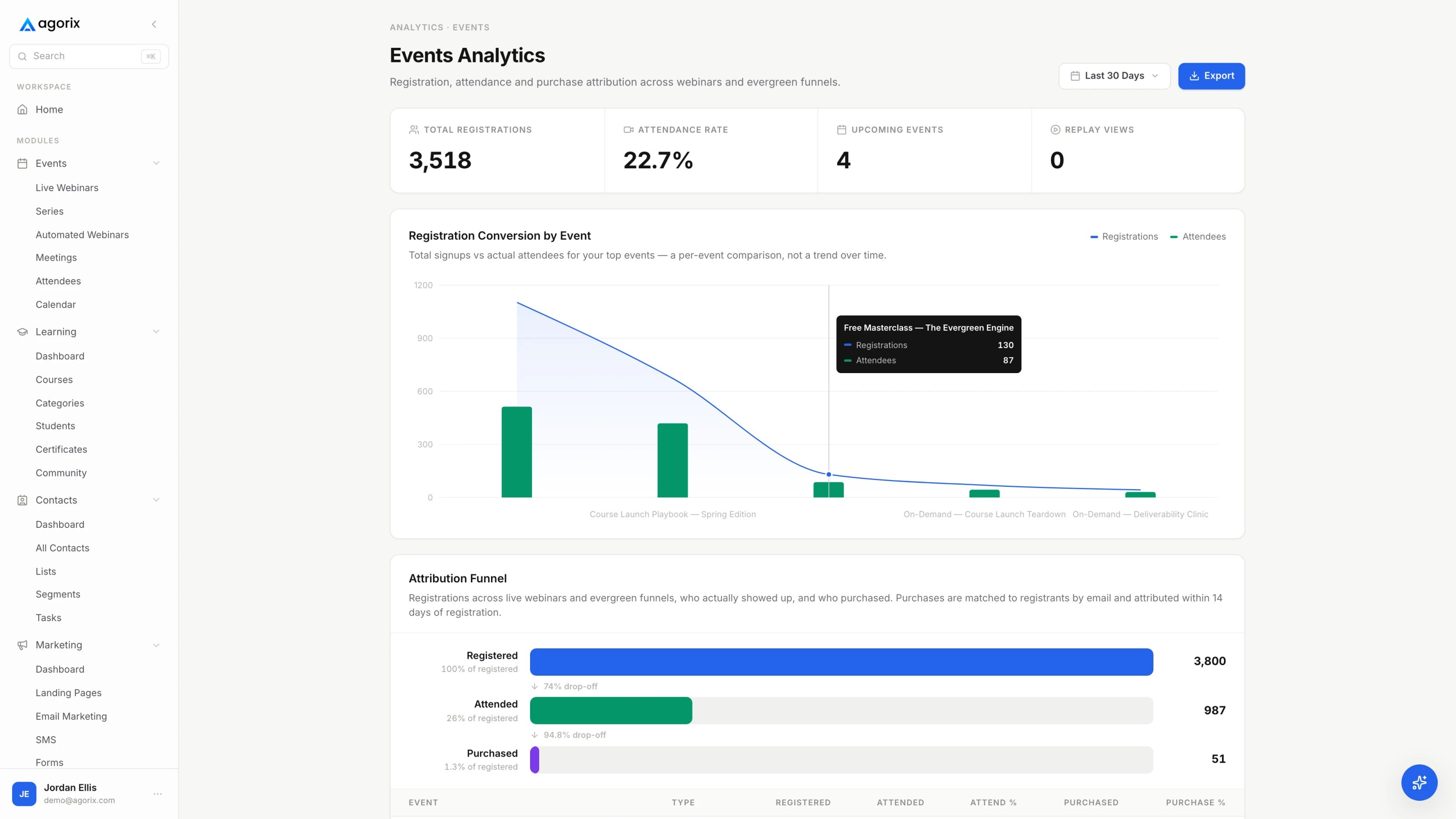
The Agorix events analytics view showing registrations against attendance per event, and the funnel from registered to attended to purchased.
AgorixAttendance and purchase behaviour is already on the record the follow-up reads from.

Selling the seat, and selling the offer

Zoom

Zoom can take money, and it is worth being precise about which money. Base Webinars can charge a registration fee through PayPal on the registration form. Webinars Plus and Events add proper ticketing — free and paid tickets, with a Stripe or PayPal Business account required to sell them. All of that sells the seat.

Agorix

Checkout, subscriptions and order bumps are on every paid plan, with one-click upsells from Growth, and the purchase lands on the same record as the registration and the watch time that preceded it.

What it means

The seat is not the sale. If the webinar exists to sell a $2,000 programme at minute 47, then on Zoom that purchase happens in a system which does not know the webinar happened.

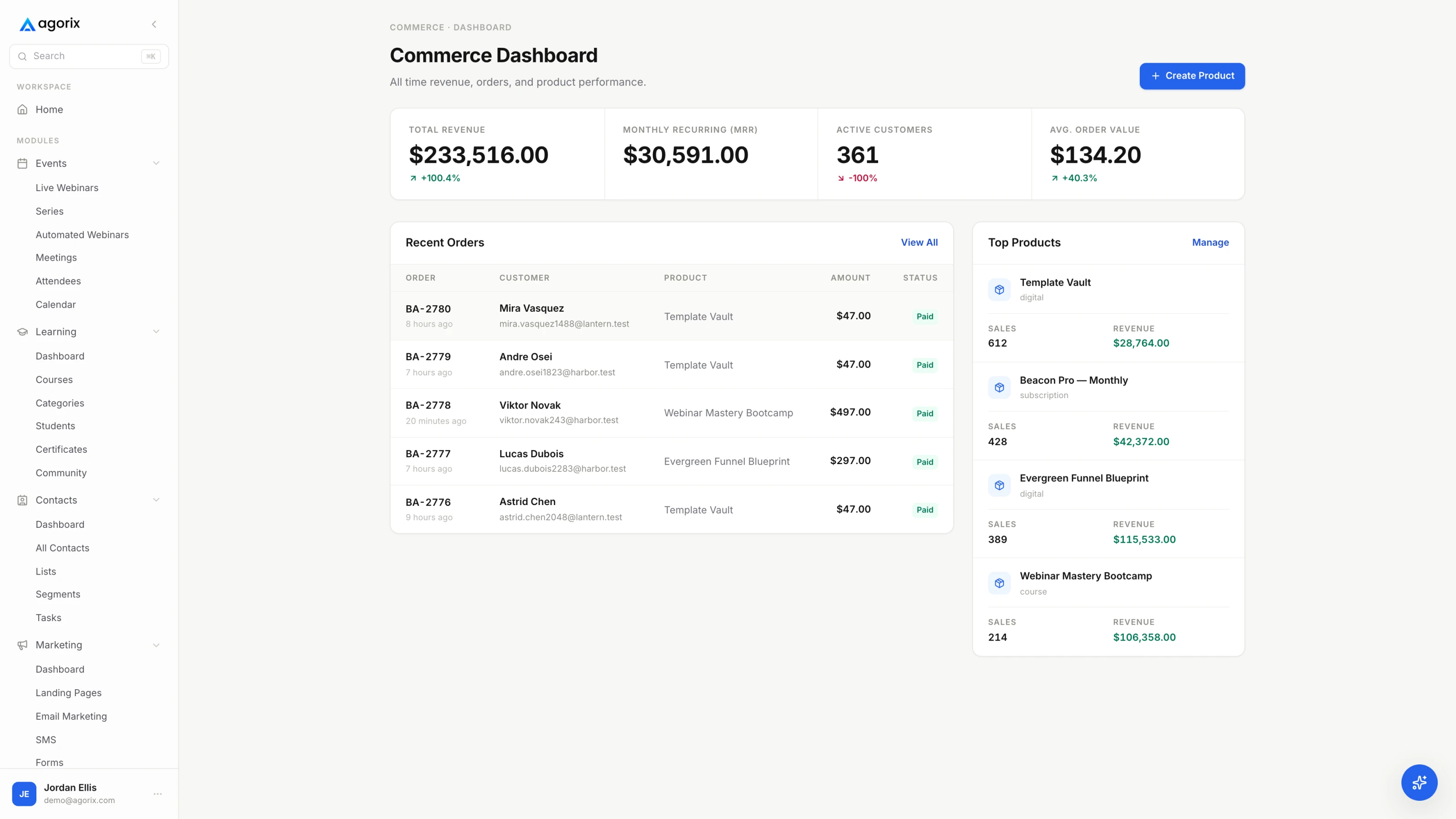
The Agorix commerce dashboard showing revenue, monthly recurring revenue, recent paid orders and the products earning them.
AgorixCheckout sits on the same record as the session, so revenue attaches to the webinar that produced it.

Evergreen, and which license it costs

Zoom

Both halves of evergreen exist at Zoom, on different shelves. On-demand webinars run on base Webinars with automatic cloud recording and registration enabled — but Zoom documents them as incompatible with the PayPal integration, attendee emails, post-attendee links and surveys, and they do not support recurring webinars. Simulive, where a cloud recording plays as a scheduled live session while the host and panelists work chat and Q&A live and can hand over to a genuinely live session afterwards, requires a Zoom Events Unlimited or Zoom Webinars Plus Unlimited license.

Agorix

Scheduled, just-in-time and on-demand sessions run where currently supported, with each viewer attached to the same record: where they joined from, how far they watched, whether they reached the offer, and what they did the next day. Evergreen is limited on Launch and expands from Growth upward.

What it means

Zoom has the evergreen format. What it costs is a tier change — and the version that runs on the base plan is the one Zoom documents as turning the attendee emails off.

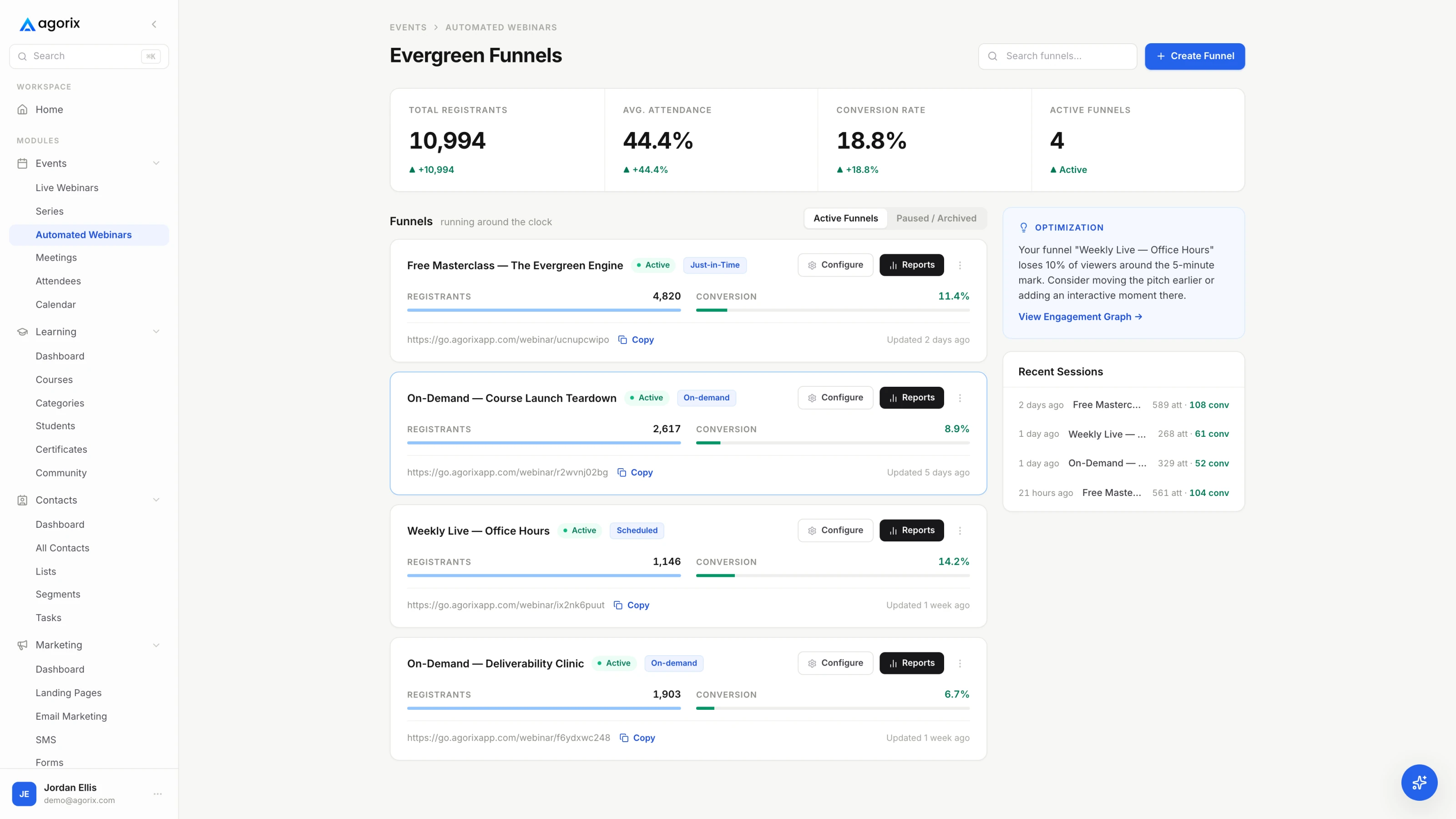
The Agorix automated webinar scheduler showing recurring session times and registration windows.
AgorixEvergreen sessions keep viewer-level watch-time behaviour on the same record as live ones.

Delivering what you sold

Zoom

This sits outside the webinar SKUs. Zoom’s Webinars Plus materials do reference learning certifications and video channels, so the honest line is that Zoom does not publish a course product — not that nothing adjacent exists. A product with lessons, student progress, a portal and certificates is not documented on Zoom’s webinar product pages.

Agorix

Course building, the student portal, certificates and progress are on every paid plan, and a buyer’s course progress sits on the same timeline as the webinar they attended and the offer they clicked.

What it means

The customer who bought at minute 47 has to be delivered to. On Zoom that is another platform, another login for them, and another export for you.

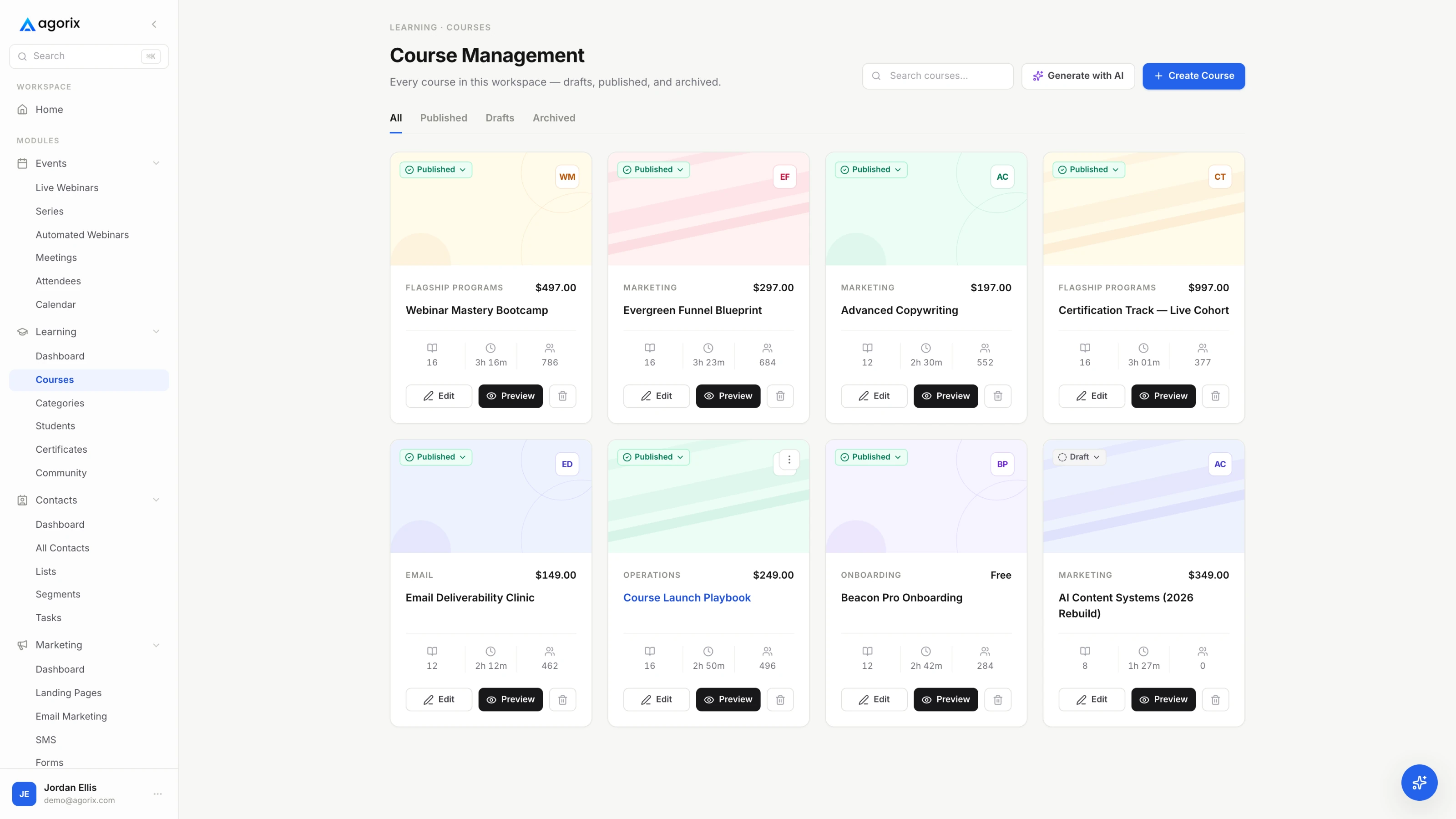
An Agorix course builder showing modules, lessons and student progress.
AgorixCourse progress lands on the same customer timeline as the session that sold the course.

Workflows, and what the AI is pointed at

Zoom

Webinars Plus includes Zoom’s AI features aimed at the event itself: generating text, images and video for event pages and assets, and repurposing content afterwards, with analytics stepping up to engagement scoring, cross-event views and attendee profiles.

Agorix

The Agorix AI Operator works from the shared customer and business context and prepares operating work — funnels, pages, emails, segments, workflows, course material, funnel audits — for a human to approve. Capacity is metered in AI Credits, so you can see what a task can spend before you approve it.

What it means

Both are real AI, pointed at different things. Zoom’s makes the event look and read better. Agorix’s prepares the work that happens after the event, and stops at an approval gate.

05Pricing

Zoom’s room is cheaper than our platform. That is the honest headline.

It is also not the comparison that decides anything. The real line is Zoom plus your email platform, plus your page builder, plus your checkout, plus your course tool — against Agorix. Zoom figures verified 28 July 2026 from Zoom’s own webinar [1] and Workplace [2] pricing pages; Agorix figures from our pricing page.

AgorixMonthly / annual · saves 20%
Launch — 100 live attendees · 5,000 contacts$149 / $119
Growth — 250 live attendees · 25,000 contacts$399 / $319
Pro — 500 live attendees · 75,000 contacts$799 / $639
Business — 1,000 live attendees · 200,000 contacts$1,499 / $1,199
Every paid plan includes the whole platform — live and evergreen webinars, meetings, courses, marketing, CRM, commerce, workflows and the AI Operator. The tier sets capacity, not access. Launch, Growth and Pro are self-serve; Business and above are sales-led.
ZoomAnnual · verified 28 July 2026
Workplace Pro — required under every webinar SKU$14.16 / user
Webinars — 300 attendees$66.67
Webinars — 500 attendees$83.33
Webinars — 1,000 attendees$283.33
Webinars Plus — 500 attendees$290.83
Zoom Events — 500 attendees$415.83
Webinars — 3,000 and 5,000 attendeesNot quoted
Webinars — 10,000+ attendeesContact sales
US-dollar annual-subscription list prices, per month, read from Zoom’s pricing page on 28 July 2026. Zoom also publishes monthly and pay-per-attendee plans, which we do not quote because we did not verify them line by line — the same reason the 3,000 and 5,000 tiers read “not quoted” rather than carrying a number. Every webinar SKU carries the footnote “Zoom Workplace Pro Required”, so a single host at 500 attendees is the Webinars line plus a Workplace license.
The capacity question

The two products meter different things. Zoom prices by the size of the room, on a ladder that runs to 100,000 — a ceiling we do not come close to. Agorix prices by contacts, email volume, AI capacity and room size, and tops out at 1,000 live attendees on Business and 2,500+ on Agency / Enterprise. What Agorix adds is an escape valve for the one busy night: a one-time boost for a single event instead of a permanent upgrade you keep paying for afterwards.

+250 attendees, one event$49
+500 attendees, one event$99
+1,000 attendees, one event$249
+2,500 attendees, one event$499

Run the numbers against your own next webinar.

Add up what the room, the email platform, the page builder, the checkout and the course tool cost you this month. Then run one session on a platform where those are the same bill and the same record.

14 days · $0 due today · Payment method required · Cancel before first charge and pay nothing
06Switching path

Keep the format. Upgrade the funnel.

This is the rare migration where the honest advice is to not migrate much. Your meetings stay where they are, your recordings stay where they are, and one webinar moves.

1First

Keep Zoom. This decision is not about your meetings

Daily calls, client sessions, internal all-hands and customer training have nothing to do with this choice, and nothing about them has to change. The only question on the table is where the marketing webinar runs.

2Then

Take the reports before you take anything else

Export the registration and attendee reports for the webinars that matter. On base Webinars they come out as CSV, and they carry the join times, leave times and total time in session you will want as history on the new record.

3Then

Rebuild one funnel, not your calendar

Pick the single public webinar that produces the most revenue. Rebuild its registration page and reminder sequence in Agorix and run the next session in the native room — one journey, with the old setup still standing behind it.

4Last

Wire the follow-up to behaviour, then decide about the rest

Once the follow-up branches on watch time and offer clicks, you will know what that data is worth to you. Only then is it worth deciding whether checkout and course delivery should move too.

Self-serveLaunch includes self-serve onboarding. A single webinar journey rarely needs help.
$499 setup packageOptional on Growth, for teams that want the first connected journey configured with them.
$1,500 funnel migrationOptional on Pro, for multi-offer accounts moving several funnels at once.
Scope it firstConfirm systems, data, journeys, responsibilities, timeline and acceptance criteria before implementation begins. Book a migration walkthrough.
07Where Zoom is the better fit

Six reasons to stay on Zoom.

Written by us, about a competitor, on our own site. If one of these is load-bearing for your business, take it seriously — switching would cost you something real.

Zero join friction, and no account to create

Attendees join from the desktop app, a phone or the Zoom Web App in a browser, and Zoom states plainly that they do not need a Zoom account to join a webinar or event. Most of your audience has already sat in a Zoom room this week. That familiarity is a real conversion asset and it belongs on the other side of the ledger. [7] [1]

Scale you will probably never need, available anyway

Zoom’s pricing FAQ states its products support up to 100,000 attendees with the native engagement features intact, on a ladder that runs 300, 500, 1,000, 3,000, 5,000 and 10,000+. Agorix tops out at 1,000 live attendees on Business and 2,500+ on Agency / Enterprise. If one event a year is genuinely enormous, that gap is decisive. [1]

Compliance your security review has already accepted

Zoom publishes ISO 27001, ISO 27017/18 and ISO 27701, SOC 2 Type 2, CSA STAR Level 2, PCI DSS, HIPAA readiness, GDPR and FERPA — plus FedRAMP Moderate and DoD IL4 on the separate Zoom for Government platform. If procurement has already cleared Zoom, that is months you do not spend again. [21] [22]

Production depth for a broadcast that has to be perfect

Backstage, Production Studio and 1080p on Webinars Plus; automated captions enabled by default for paid accounts; up to 20 people designated as language interpreters; simultaneous streaming to YouTube, LinkedIn and Facebook; up to 100 polls in a single webinar. For a flagship broadcast with a live crew, this is a deeper toolkit than ours. [4] [18] [19] [20]

The ecosystem the room sits inside

Zoom publishes nearly 3,000 ready-to-use apps and integrations, and the webinar products sit beside Workplace, Rooms, Phone and Contact Center on the same account. If Zoom is already your company’s communication backbone, the webinar inherits all of that administration, billing and IT familiarity for free. [23]

Webinars that are not marketing at all

All-hands, town halls, customer training, partner enablement, and multi-track conferences with an expo floor, attendee networking and hybrid badge printing — Zoom Events is built for those, and none of them need a funnel. Paying for an acquisition machine to run an internal town hall is waste, and we would rather say so. [5] [1]

08Switcher questions

The six people actually ask.

Still deciding? Compare Agorix plans or book a walkthrough and bring your current stack.

Is this a comparison with Zoom Meetings?

No. This page compares Zoom’s webinar products — Zoom Webinars, Zoom Webinars Plus and Zoom Events — against Agorix. Zoom Meetings is a different product solving a different problem, and Agorix is not trying to replace the tool your team uses for daily calls.

One naming note, since it causes real confusion: Zoom’s pricing page currently publishes those three SKUs. A tier called Zoom Sessions does not appear on it, so this page does not use that name.

Do I have to stop using Zoom?

No, and most people should not. Keep Zoom for meetings, client calls and anything internal — that is what it is best at, and nothing here argues otherwise. The narrower question is whether the webinar you run to acquire customers should live in the same system as the registration page, the follow-up, the checkout and the course. Plenty of businesses end up running both, on purpose.

Can I just connect Zoom to my CRM instead?

Yes, and it works. Zoom documents integrations with Salesforce, HubSpot, Marketo, Eloqua, Pardot, InfusionSoft, Ontraport and Zapier, and they will move registration and attendance across. What you keep is two systems of record and a reconciliation job that never ends, plus whatever shape the connector imposes — Zoom’s own Marketo documentation, for example, notes that recurring webinars are not supported and that registration has to happen through Marketo rather than Zoom’s registration page. If that trade is working for you today, this page is not an argument against it.

Is Agorix cheaper than Zoom Webinars?

Against the room alone, no. At 500 attendees Zoom Webinars is $83.33 per month billed annually, plus the Zoom Workplace Pro license every webinar SKU requires at $14.16 per user per month billed annually. Agorix Pro, which carries 500 live attendees, is $639 per month annual-equivalent. The fair comparison is against the whole stack — Zoom plus your email platform, page builder, checkout and course tool — and whether that comes out cheaper depends entirely on what those four cost you today.

Zoom goes to 100,000 attendees. What do you top out at?

1,000 live attendees on Business and 2,500+ on Agency / Enterprise, plus one-time room boosts from $49 to $499 that add 250 to 2,500 seats for a single event without a permanent plan change. That is a real ceiling and it is far below Zoom’s. If you regularly fill a room bigger than that, Zoom is the right tool and we would rather tell you now.

Is the AI Operator included in the free trial?

No. The current self-serve trial does not enable the AI Operator. Paid plans include monthly AI Credits, and a walkthrough can show how the Operator uses shared customer and business context before you pick a plan.

One connected record

Keep the format you already run — upgrade what happens around it.

Start with the next webinar you were going to run anyway. Build the registration page, run the session in the native room, and see what the follow-up knows when it starts.

14 days · $0 due today · Payment method required · Cancel before first charge and pay nothing

Sources

Competitor details last verified 28 July 2026
  1. [1]Zoom — Webinars, Webinars Plus and Events pricing: SKU lineup, attendee ladder, annual list prices, “Zoom Workplace Pro Required”, and the FAQ covering 100,000 attendees, 30-hour maximum, pay-per-attendee licensing and attendees needing no Zoom account
  2. [2]Zoom — Workplace plans: Pro and Business per-user monthly and annual prices, participant limits, per-license cloud storage
  3. [3]Zoom — Webinars product page: support for up to 100,000 attendees; simultaneous broadcast to YouTube, LinkedIn and Facebook over RTMP
  4. [4]Zoom — Webinars vs Webinars Plus: registration-page scope, Backstage, Production Studio, Simulive, 1080p, advanced analytics, AI text and image generation, learning certifications and video channels
  5. [5]Zoom — Event solutions: multi-track and multi-day events, virtual expo hall, attendee networking, hybrid check-in and badge printing
  6. [6]Zoom Support — Getting started with Zoom Webinars: prerequisite is “a Licensed user with the Webinar Add-on”
  7. [7]Zoom Support — Joining a webinar: attendees join from the desktop app, mobile app or the Zoom Web App in a browser
  8. [8]Zoom Support — Customizing webinar registration: automatic or manual approval, registrant limits, custom questions, social share buttons, tracking pixels, and charging a registration fee through PayPal
  9. [9]Zoom Support — Webinar branding: banner, logo, theme colors, and up to 20 speakers with bios and photos
  10. [10]Zoom Support — Webinar email settings and templates: fixed reminder and follow-up windows, hosts limited to the subject line and added text, admin template editing requiring HTML, CSS and FreeMarker, and an unmodifiable From field on Pro accounts
  11. [11]Zoom Support — Webinars Plus emails: date, offset and rule triggers, with recipients filtered by registration method, ticket type, payment status and session attendance
  12. [12]Zoom Support — Webinar reports: registration, attendees with join time, leave time and total time in session, performance, Q&A, polls and surveys
  13. [13]Zoom Support — On-demand webinars: available with the Zoom Webinars add-on, but incompatible with the PayPal integration, attendee emails, post-attendee links and surveys
  14. [14]Zoom Support — Simulive: requires a Zoom Events Unlimited or Zoom Webinars Plus Unlimited license; host and panelists work chat and Q&A live and can transition to a live session after playback
  15. [15]Zoom Support — Webinars Plus ticketing: free and paid tickets, with a Stripe or PayPal Business account required to sell them
  16. [16]Zoom Support — Integrations: Salesforce, HubSpot, Marketo, Eloqua, Salesforce Pardot, InfusionSoft, Ontraport and Zapier
  17. [17]Zoom Support — Zoom for Marketo: registrant and attendee field sync, with recurring webinars not supported and registration required through Marketo rather than Zoom
  18. [18]Zoom Support — Automated captions: enabled by default for paid Zoom accounts across meetings and webinars
  19. [19]Zoom Support — Language interpretation: up to 20 participants can be designated as interpreters, and webinar interpreters are automatically made panelists
  20. [20]Zoom Support — Webinar polling: up to 100 polls for a single webinar, each with up to 100 questions
  21. [21]Zoom — Legal and compliance: ISO 27001, ISO 27017/18, ISO 27701, SOC 2 Type 2, CSA STAR Level 2, PCI DSS, HIPAA readiness, GDPR and FERPA
  22. [22]Zoom — FedRAMP: Moderate authorization on the Zoom for Government platform, a separate offering for US Federal and Department of Defense communities
  23. [23]Zoom — Apps and integrations: “nearly 3,000 ready-to-use Zoom Apps and Integrations”

Agorix plan prices, capacities, trial terms and migration packages come from our own pricing page. Zoom’s pricing page renders its prices in the browser and varies with the currency selector; the figures above are US-dollar annual-subscription list prices read from it on 28 July 2026. Facts we could not verify from a Zoom-owned page are therefore not stated anywhere above: monthly rather than annual webinar-family prices, the 3,000 and 5,000 attendee tier prices, Webinars Plus and Events prices at any tier other than 500 attendees, and any figure for Zoom’s network or data centres. Zoom’s own pages carry two different maximum-attendee numbers — the 100,000 on its current pricing page and a higher figure in older support articles — so we cite the pricing page. Competitor pricing and features change; this page is re-verified quarterly and the stamp above moves with it. No Zoom logos or interface screenshots appear on this page by design.